Summary
Making beautiful and feasible volumetric effects has been a trending topic for game development. Inspired by the Gears 5 tech talk and the good ol’ Guerrilla paper on cloudspaces, I decided to do my own take and created this fluffy dry ice fog using Volumetric Fog feature that comes with UE4.
https://twitter.com/Vuthric/status/1226257386131746817
This is done purely within Volumetric Fog and Volume Material systems, thus requires no low-level coding and supports various lighting feature within UE4.
Volumetric Fog
Volumetric Fog has been in Unreal Engine since 4.16. Comparing to custom volumetric raymarcher, which usually only supports one directional light and skylight, UE4 Volumetric Fog supports one Directional Light, any number of Point and Spot Lights, Skylight, all with various shadowing method support like static shadow, CSM, distance field soft shadow and DFAO. It also supports Volumetric Lightmaps and Particle Lights. it’s well embedded into the engine with good performance.

The major downsides include lacking IES support, doesn’t work with Ray Tracing and most importantly, no self-shadow or light scattering for performance reasons. Later we’ll learn some neat tricks to fake self-shadow as a workdaround.
Before Getting Our Hands Dirty
Before starting I need to make clear that what we are going to create is a pretty demanding visual effects. Volumetric fog is targeted for mainstream PCs/Consoles, but in order to express the detailed shapes of dense fog we need to crank up the parameters by quite a bit.
For the sake of demonstration I tuned up the quality by changing cvar:
r.VolumetricFog.GridPixelSize 4
Which costs ~4ms on a 2080Ti (1080p) for the final FX.
Default GridPixelSize value is 8. Half the value means there are 4x more voxels to render for the same screen resolution. And because we’ll do multiple texture sampling per voxel it costs even more. Final fog is about 8 times as much consuming than regular volumetric fog at high quality (as in the video); 2 times as much consuming at default quality.
It’s important that you understand this. For learning’s purpose, you can maximize the quality as long as your machine runs it smoothly.
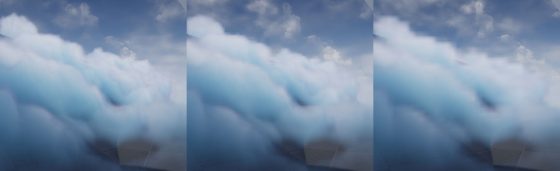
Click to zoom in
I’ll talk more about optimization in the last section of this article. You can tweak it to fit your needs but most importantly, after going through this project you’ll learn about great ways to control volumetric fog in 3D space, which may also be used on top of other VFX to achieve richer, thicker atmosphere.
Local Controls
Firstly you still need to setup your Exponential Height Fog actor and enable its Volumetric Fog option. Decrease the density to 0.00001 and change fog actor location to (0, 0, -9999999) if you don’t want global fog.
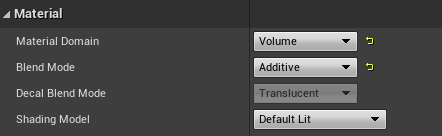
Materials using the Volume domain describe Albedo (color), Emissive, and Extinction (opacity) for a given area in space for the volumetric fog. For example you can create a 3D sphere with simple SphereMask by hooking up Absolute World Position, Object Bound to SphereMask node.
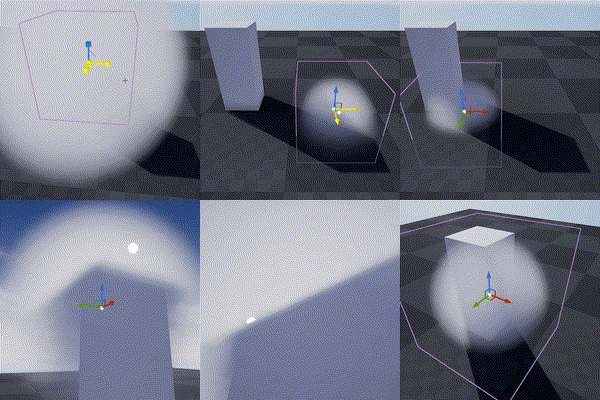
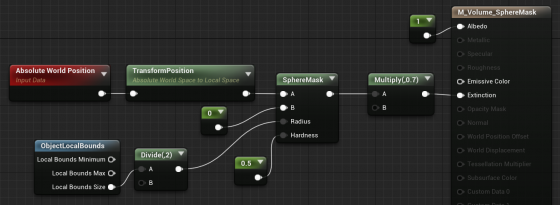
The material is applied to a cube mesh. Normals of the cube don’t need to be inverted. Two-sided material is not needed either. In fact it doesn’t even matter if it’s not a cube. Engine only uses the bounds of the mesh for if it uses Volume material.
Knowing this we can do all sorts of fun tricks. Let’s start with the basics:
3D Noise

The obvious step forward is adding 3D noise. Since multiple voxels are computed for every [GridPixelSize*GridPixelSize] pixel grid on screen. The Volume material needs to be fast. For the Noise node, Fast Gradient – 3D Texture option is our only bet here.
And we can easily get this low hanging fruit of a volume effect by using the material above:
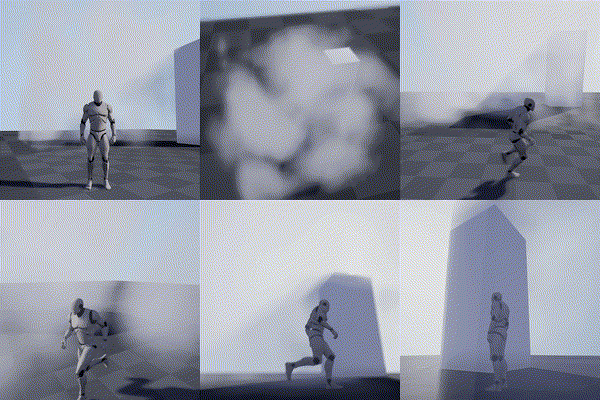
Fake Godrays
This section is not required for the fog effect we aim to achieve, but it’s a great example of using simple math to achieve nice looking and cost efficient results. In this awesome tutorial by Sjoerd De Jong from Epic, he mentioned a method to add artificial god rays which gives the light a lot of rich details.
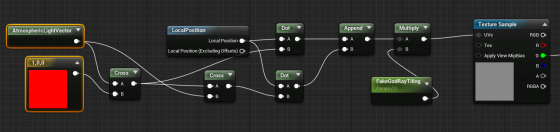
Basically you use cross operator to get two vectors that are perpendicular to the light vector and perpendicular to each other. Then use them as UV input for a perlin noise texture. This projects the 2D texture along the light direction:
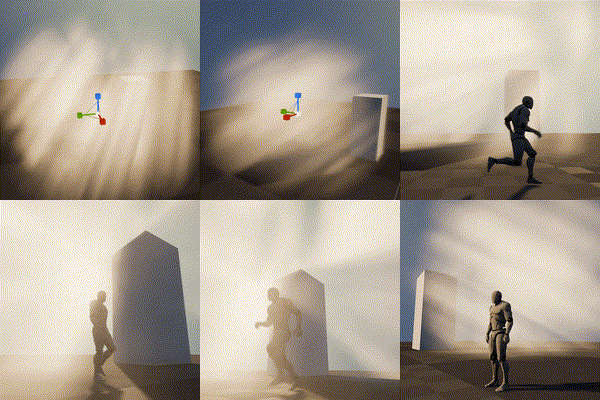
A more practical demonstration from my tech talk (link, it’s in Chinese):

Because I love giving badass names to my demos
Now you may notice the nice looking dense cloud movement on the ground. That’s was my first attempt at creating this effect 🙂

Dense Cloud
As mentioned earlier, dense Volumetric Fog doesn’t work very well because we lack self-shadowing, while on the bright side, it integrates well with engine lighting features. We can fake shadows in various ways then cover up the flaws with lighting and animation.
Here is a list of missions we need to accomplish:
- ‘Ground’ the volume to surface
- Create Cloud like patterns and behavior
- Fake self-shadow
- Achieve good enough performance so people have a chance to see it in you game
Distance Function
In the Gears 5 talk, Colin mentioned they generated heightmaps for their maps, which are then piped into the Volume Material to act as a mask. This basically says okay we got nice 3D cloud in the air but fade it out when it’s far away from the ground.
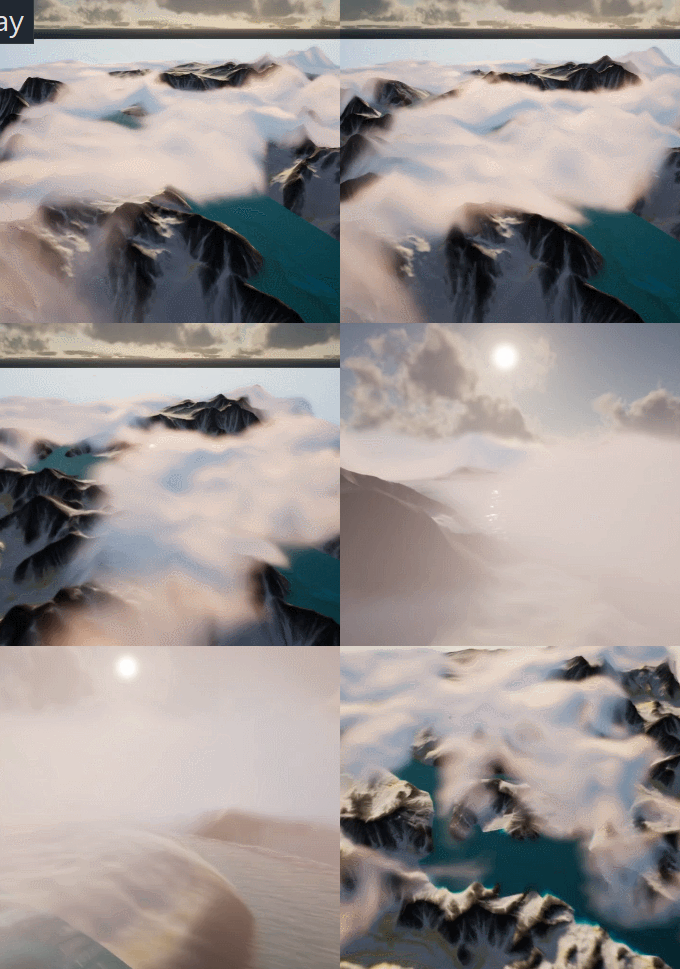
A quick example showing dense cotton candy blowing over mountain tops
For this article though, we are going to use Distance Field instead of heightmap for simplicity’s sake (heightmap is faster but custom tools are needed to generate them).
After turning it on. We can simply use Distance to Nearest Surface node to access global distance field data in the material graph:

Note that Global Distance Field only generates as far as 395.75 cm to any surface (balance between range and precision). So it’s doesn’t really work for huge scale FX like the mountain Cotton Candy (I simply used the landscape heightmap there).
A Brief on Volume Textures in UE4
Now we know how Volume Material works and how it can interact with the scene, the gracious time has come to talk about 3D textures. Unreal Engine 4 has added Volume Texture support since 4.21. It works by taking a 3D shape and slicing it into cross-sections, which are then placed into a grid on a 2D Texture. Volume Texture asset can automatically convert the 2D texture into a 3D one.
Volume Texture imported from Houdini
(Optional part, read if you are interested in VDB)
It’s also possible to feed a function into UVolumeTexture::UpdateSourceFromFunction() to read from VDB files directly. Here is an example I did a while back that imports a single VDB file into a Volume Texture asset.
Note: This is a very experimental test and it only supports older VDB files since I imported OpenVDB library from UE4 ProxyLODPlugins.
    auto QueryVoxel = [&](const int32 x, const int32 y, const int32 z, void* ret)
    {
        openvdb::Coord xyz(x + Start.X, y + Start.Y, z + Start.Z);

        if (TextureFormat == ETextureSourceFormat::TSF_G8)
        {
            uint8* const Voxel = static_cast<uint8*>(ret);
            Voxel[0] = accessor.getValue(xyz) * 256 * ValueScale;
        };
        if (TextureFormat == ETextureSourceFormat::TSF_RGBA16F)
        {
            half* const Voxel = static_cast<half*>(ret);
            Voxel[0] = accessor.getValue(xyz) * ValueScale;
            Voxel[1] = 0;
            Voxel[2] = 0;
            Voxel[3] = 0;
        }
        // Only listing two formats here
    };

    VolumeTexture->UpdateSourceFromFunction(QueryVoxel, End.X - Start.X, End.Y - Start.Y, End.Z - Start.Z, TextureFormat);
    VolumeTexture->MarkPackageDirty();

    return true;
We can choose which texture format we want to save as Volume Texture. Usually 8 bit per channel is good enough for volumetric FX.
This covers how to use one layer of static volume data. To make natural looking cloud of fog, we need to stack multiple layers of 3D noises with a strong art direction, not unlike how we fake water waves with 2D noises (as normal maps or height offset). It’s a very challenging task, fortunately this is a topic that has been experimented with by a lot of super awesome FX artists. I’ll try to sum up what I’ve learned in next sections.
Shaping The Cloud With 3D Noises
Author 3D Noises
There’re multiple ways to create 3D noises. I’m going to first talk about how to create them in Houdini, then introduce a way to generate them in UE4 (4.25 and later) directly.
The reason being, the process is more instinctive in Houdini, there are existing nodes designed specifically for this job. Previewing tweaks is better too. However if you’re not familiar with Houdini or want to keep the workflow fancier, the new Volumetrics plugin coming to 4.25 has legit tools to keep the process inside UE4 kitchen.
Create The Base Layer (with Houdini)
The most important noise layer that immediately yield great result for me is what Guerrilla Games calls Perlin-Worley noise.
As mentioned, Houdini is very powerful for these kind of job and comes with native periodic Perlin / Worley noise nodes. Here is the Volume Vop for periodic Perlin fractal noise:

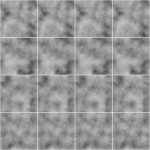
The for loop is a little tricky to use if you’re not familiar with it. Once you got that you can easily generated another periodic Worley fractal noise volume:

then multiply them together:
(You can do this inside a Cop net)
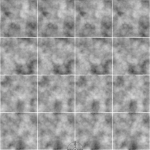
The first Perlin noise uses a very common technique called fBm (fractal Brownian motion), which basically means fractal — you combine noises with different frequencies together to get a more detailed noise while maintaining the macro shape.
Worley noise algorithm is pretty simple. For 3D noise, the voxel value is second shortest distance between the voxel scattered points in space. That gives us this fluffy visual characteristics. When mixed in the cloud volume it can either separate the volume in bubbly sections or give the edge some nice wispy details.
Combining with the distance function technique we mentioned before, the Perlin-Worley noise instantly gives you this clean and detailed look:
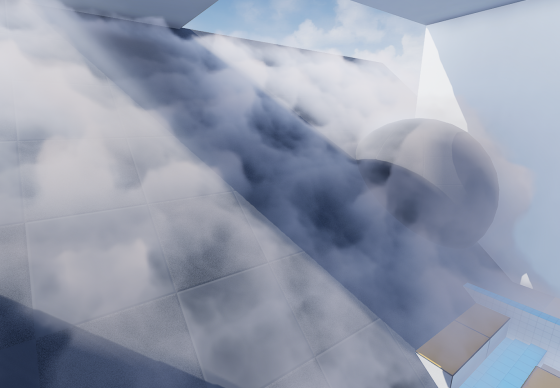
To sample Volume Texture, you treat them as 2D textures but instead of UV(float2) you feed in a UVW(float3) as coordinate in 3D space.
You can spot the consistent visual feature of Perlin noises, also the billow features from Worley noises here, which gives us a solid base shape for the cloud we’ll continue adding details to. Adding panning to the UVW input will instantly give you flowy results if the panning direction is not completely parallel to surface tangent.
Update 2020-07-01: Uploaded the .hip file since a lot of you folks are asking for it and the peer pressure is weighing me down. (actually .hiplc since I only have indie license on my WFH machine)
Create The Base Layer (within Unreal Engine 4)
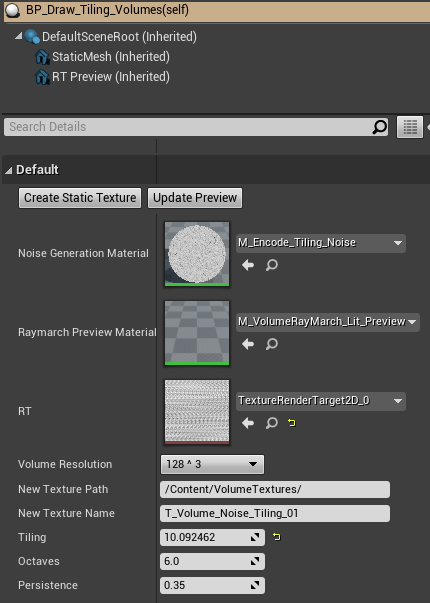
This is the alternative way to author 3D noises within UE4. This awesome Volumetrics plugin by Ryan Brucks is only available in dev-main branch at the time of writing. You can find BP_Draw_Tiling_volume under Plugins\Volumetrics\Content\Content\VolumeTextures\Blueprints
Usable is pretty straightforward. Click Create Static Texture button to instantly generate a uasset of that. You can dig inside and see how it works.
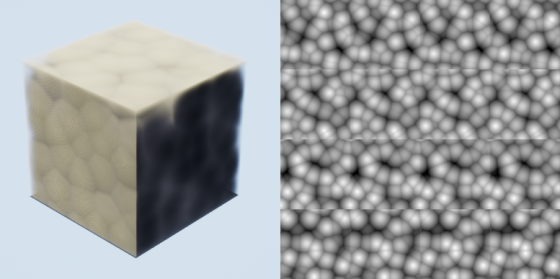
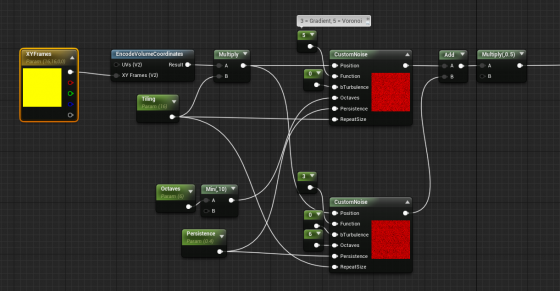
The core function here is M_Encode_Tiling_Noise, which describe the 3D texture it’s going to generate. It doesn’t come with the Perlin-Worley noise as mentioned but we can easily modify it to our heart’s content.
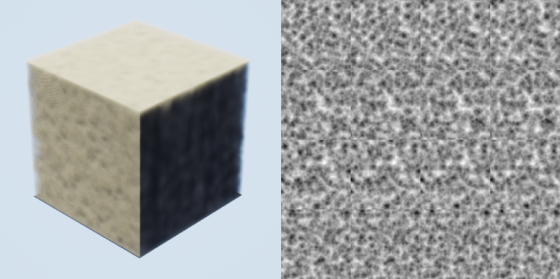
The custom node takes inputs and generates 3D noises, while Function parameter describles the noise type. Default is one gradient 3D noise as output. Here I add a Gradient (Perlin) noise and Voronoi (Worley) noise together then multiply it by 0.5. Hit Create Static Texture button we can achieve similar result as the Houdini one.
Stacking Noises To Replicate Dry Ice Fog Movement
As mentioned before. Worley noise works nicely for both macro and detail shaping. Similar to 2D textures, we can add/multiply layers of 3D noises with different patterns and panning speed to achieve a more dynamic result. To demonstrate this clearly, here’s 2 layers of 2D
panning noises multiplied:
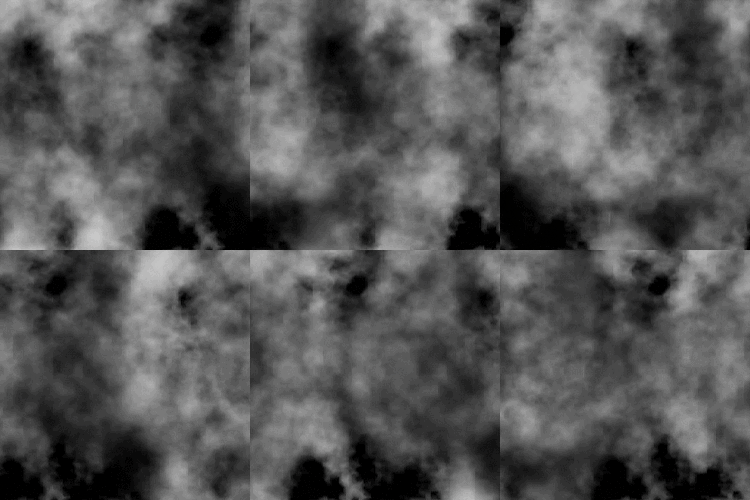
We want similar things in 3D so the fog will appear to be flowing. However, 3D noises are very expensive. For example 512^3 volume texture roughly equals 11.5k*11.5k in 2D and currently UE4 doesn’t support 3D texture streaming. Sampling such large textures multiple times, in multiple voxels, for every [GridPixelSize*GridPixelSize] pixels on screen takes a big toll on the performance.
A better strategy is stacking 3 layers of lower resolution 3D noises (128^3 for example) instead of 2 high resolution. And because the 3 layers have aggressively larger scale, they make up for low resolution:
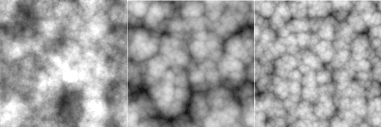
It’s not as detailed, but the extra layer adds a lot more complexity to it so we don’t see any repeated patterns.
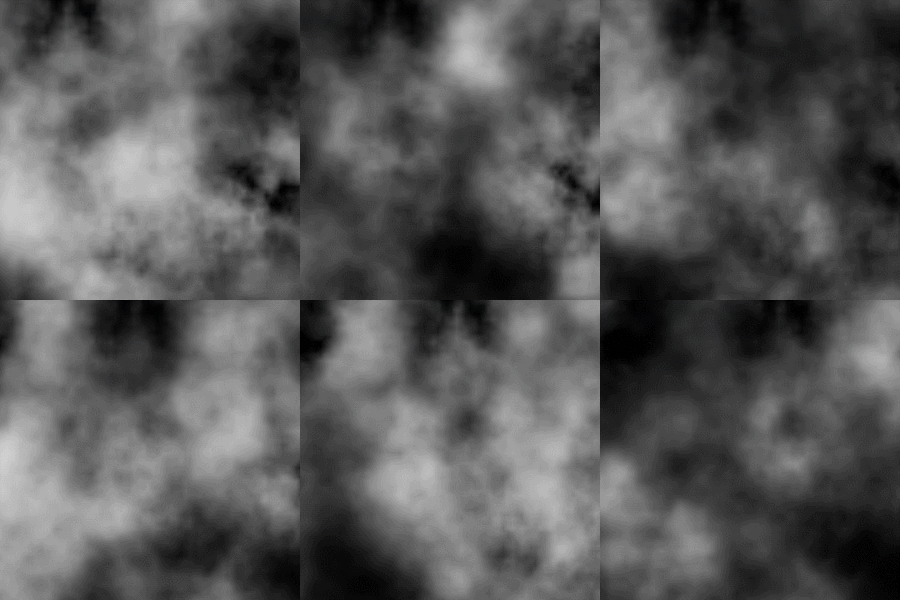
The 3 layers of 3D noises are encoded into RGB channels of a Volume Texture respectively:

With a little tweaking, you’ll manager to get this:
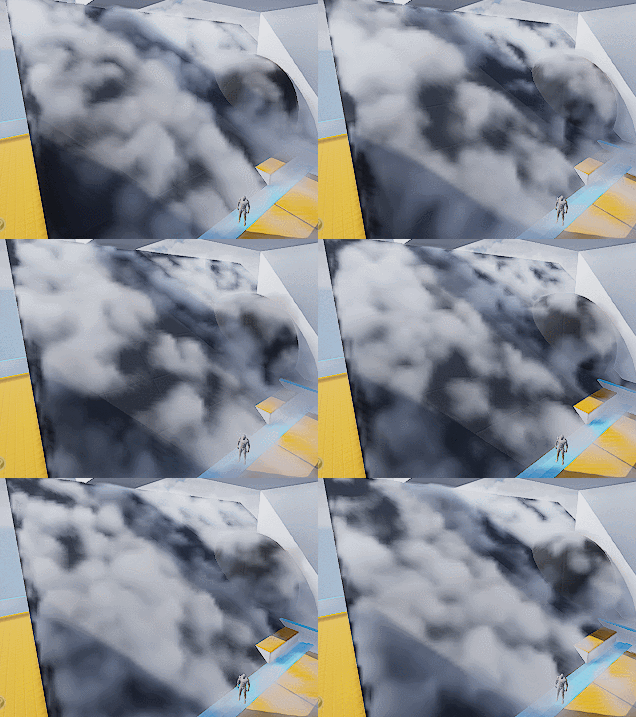
Which looks like absolutely nothing. Here begins the journey of parameters tweaking. Consider this a triumph for your tech art skills. The 3D noise behavior will start making sense when you start hallucinating.
A tip I can give though is to start simple and make sure you get a good base to work with. I spent a lot of time experimenting with the noises and trying to replicate dry ice fog movement, with only two layers of 3D textures (The R and G channels of our volume texture).
Also it’s important to tilt the panning direction away from surface tangent a little. It will result in a more dynamic look since distance field is constantly trimming the 3D noise.
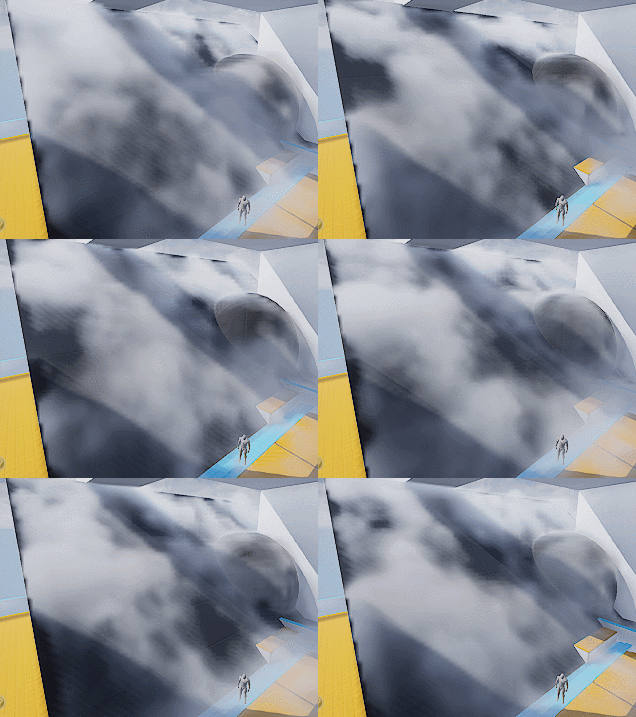
Then add a little details:
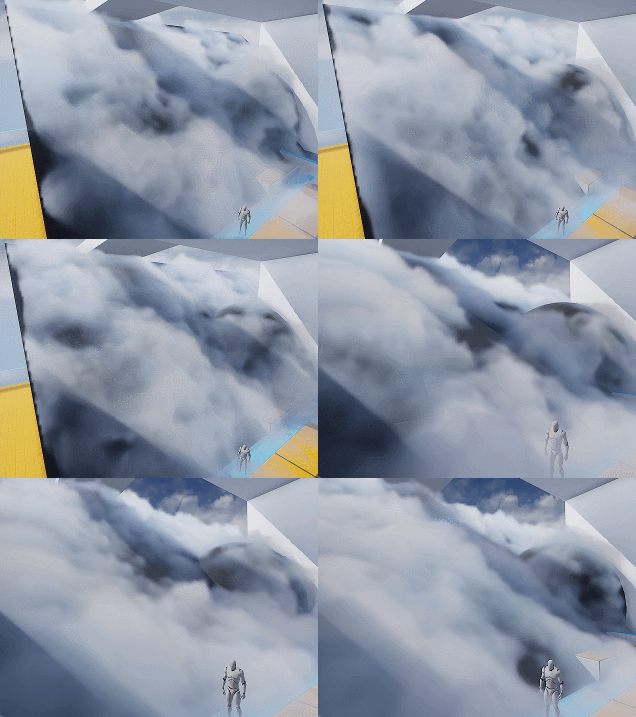
Wait what? I hear you. This feels like a ‘draw the rest of the owl’ situaltion. But the differences between the two are only two changes:
- Two more layers of noise. One of them is B channel of the volume texture, used similar to G channel. The other one is a fine tune ‘modifier’ to add refined wispy edges.
- Shadows. Offset shadow and DFAO.
Which leads to our next sections.
Add Detail – Wispy Edges
After adding another layer of Worley noise (B channel) you’ll can get something like the left picture (minus shadowing which I’ll cover later).

The overall shape is good but still lacks details. You can then add another layer of noise to A channel, or just reuse other channel to add in high frequency details (middle picture). The pattern is very repetitive but since the moving shape is already very rich, it won’t be noticeable.
Then we want to soften up the details near the ground, since dry ice fog tends to be more volatile the higher it goes (look up videos on youtube), and the slicing artifacts appear worse if the contrast is high near the ground:
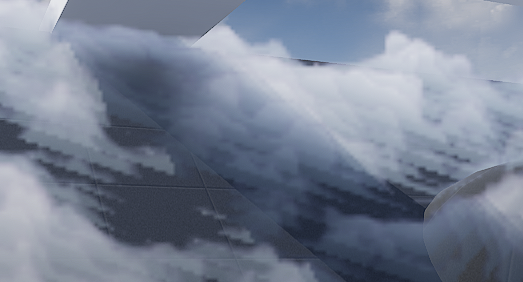
It’s fairly easy to implement the detail fading, just adjust the detail intensity according to DF value (with a power function to adjust contrast). Result is the picture on the right.
Add Detail – Curl Noise (Optional)
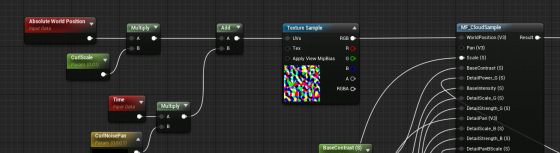
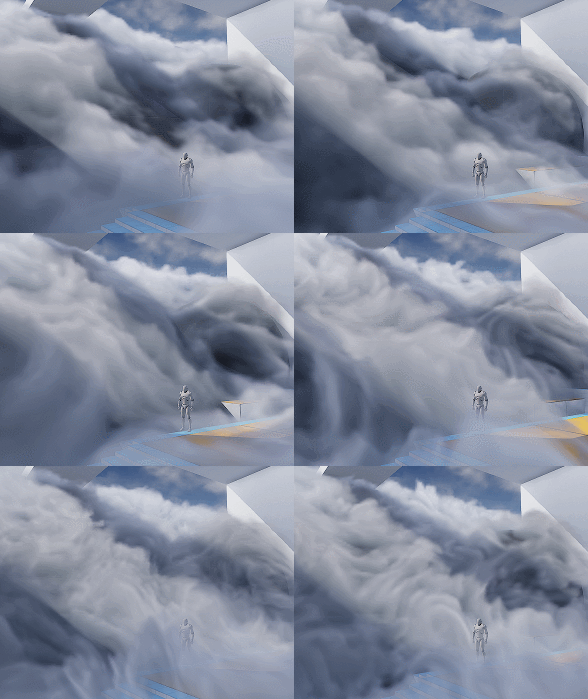
Another great way to add more character to the fog is using divergence-free curl noise to distort the space a little. It gives you stylized curvy dynamics if you cramp it up. Or add some extra curvy flavor if you can afford the extra texture sampling.
There is one under Volumetrics plugin/Content/VolumeTextures/Textures/VT_CurlNoise
Add world position with it before feeding into sampling function.
Shading
Shadow – Offset Shadow
Firstly, volumetric fog doesn’t really support self-shadowing. What we can do is darken the color of input Albedo in the Volume material to fake it. There are downsides, mainly not looking quite correct when inside actual environmental shadows (because we’re still faking shadows for directional light that doesn’t shrine through here) , which can be dealt with by raymarching scene distance field. But let’s leave that for another day.
Offset shadow, in its simplest form, is this:

The text feels solid and leaves a drop shadow on the canvas. Now if the shadow is inside the text and get blurred a little bit we get a softer shadow, which makes it look 3D.

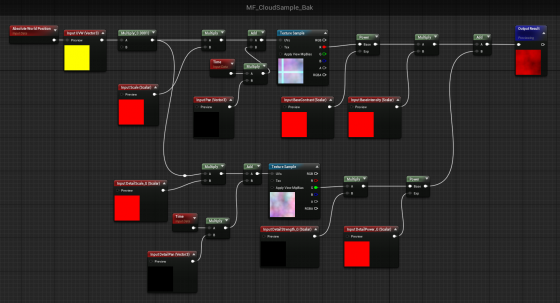
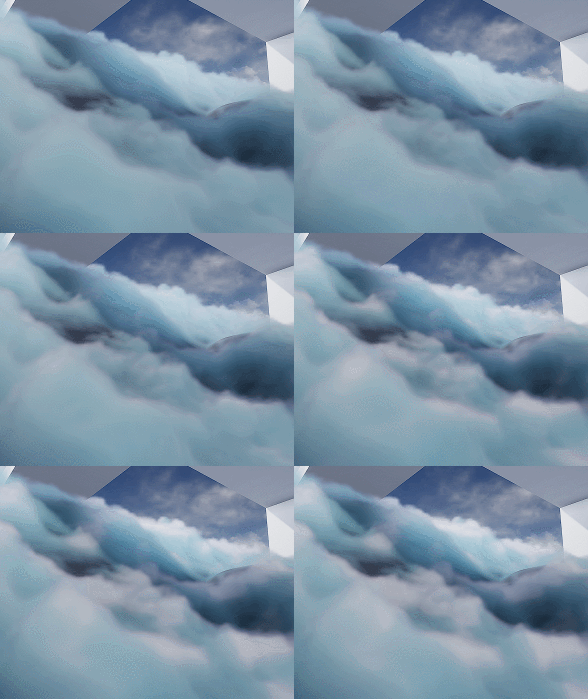
This is exact what we’ll do to the fog. We offset the input World Position A a little toward the main directional light (World Position B) and sample MF_CloudSample again. If B has density of 0, it means there is nothing blocking light to A. A should be colored as a bright color. If B has density > 0, we darken the Albedo of A by how dense B is.

Since UE4 Volumetric Fog implementation already includes temporal jitter, the line between lighted and shadowed isn’t that obvious. You can also adjust the offset length to get a more natural look.
Offset Jitter
Aside from this, I came up with the UseJitteredOffsetShadow method here. Basically you jitter the offset length of every voxel between a range. Temporal super sampling will then smooth it out. There are some artifacts but the result looks quite good. Jitter code inside the Custom Code:
int3 randpos = int3(WorldPosition.xy, View.StateFrameIndexMod8);<br>float rand =float(Rand3DPCG16(randpos).x) / 0xffff;<br>return rand;
Shadow – DFAO
Another shadowing approach that does wonders is distance field ambient occlusion. If you don’t have distance field enabled you can use heightmap as alternative.
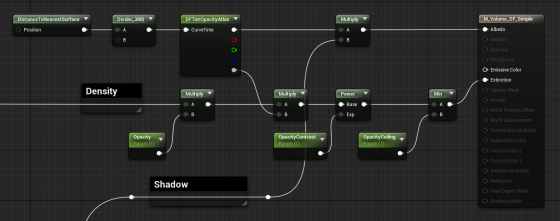
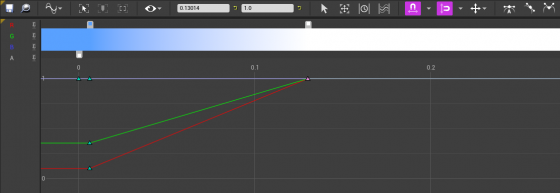
The implementation is simple — tint Albedo darker the closer it is to nearest surface. The Curve Atlas node in the graph above is an awesome engine feature that has come into existence for a while. It automatically generates a small texture from the color curve you edited, including RGBA channel. This makes adjust the DFAO tint and DF opacity influence much faster and more instinctive.
Optimization
I’m still experimenting with ideas like pre-baked scattering, and more efficient way to mask out the empty voxels. For now I’ll mention a few key points.
Since DFAO does a pretty good job in making the cloud cluster distinguishable, you may consider ditching offset shadow since that doubles the sampling cost.
It’s also very important that you understand some of the cvars config for volumetric fog. Volumetric fog is rendered into a 3D texture that will be stretched to fill your vision cone. The depth can be adjusted in ExponentialHeightFog actor – Volumetric Fog – View Distance.
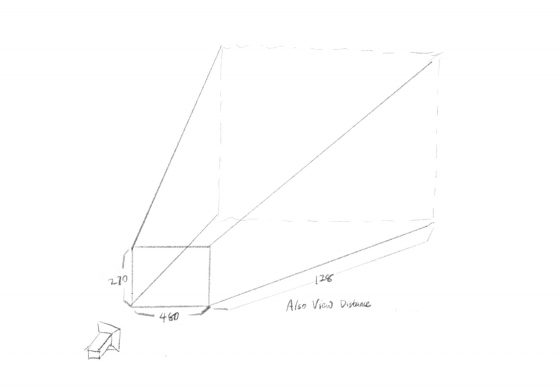
The 3D texture for this project is 480x270x128 (@1080p), as you can see in GPU Visualizer (hotkey ctrl+shift+, )
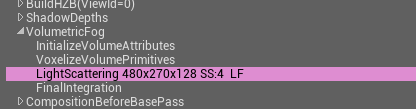
Why? Let’s see the cvars:
r.VolumetricFog.GridSizeZ 128 (default 128)
Is the resolution along the camera depth (Z) axis.
r.VolumetricFog.GridPixelSize 4 (default 8)
Is the screen pixel size per voxel in XY plane. I set it to 4, which means at 1920×1080 resolution, the XY resolution is 480×270.
Click to zoom in
These are the main parameters you can adjust to trade quality for performance very efficiently. Increase gird pixel size to 8 will make it 4x faster.
Also Decrease grid size z to 64 will make it 2x faster, but this will probably result in flickering artifacts. You can try increase
r.VolumetricFog.HistoryWeight (default 0.9)
to reduce the flickering, but the movement will appear more blurred in return. ExponentialHeightFog actor – Volumetric Fog – View Distance can also be decreased to increase quality along Z axis, at the sacrifice of rendering distance.
Finally an optimization I did that yielded noticeable result is using DF value to determine if we should sample textures and calculate output for current voxel at all. Basically you can’t do shader dynamic branching with the If node in material graph, but you can in Custom code. It’s possible to take an Alpha input calculated from distance field, to essentially avoid unnecessary texture sampling operations (and other operations) if current voxel is empty.
[branch]

// Simplified code. Ideally we should immigrate most calculations from the material graph into the if scope

[branch]
if(DF < Alpha)
{
  return float4(
    Texture3DSample(Tex, TexSampler, UVW0).r,
    Texture3DSample(Tex, TexSampler, UVW1).g,
    Texture3DSample(Tex, TexSampler, UVW2).b,
    Texture3DSample(Tex, TexSampler, UVW3).a
  );
}
else
{
   return float4(0.f, 0.f, 0.f, 0.f);
};
Speaking from the perspective of a fairly demanding reader the writing here clears the bar consistently, and a look at silvercovemarkethall continued clearing that bar, the calibration of demanding reader is something I apply to all sources and this site has been one of the few that handles the demanding reading well across pieces sampled.
melbet metode plata Moldova [url=https://www.melbet42815.help]https://www.melbet42815.help[/url]
Refreshing to find writing that does not try to manipulate the reader into clicking onto the next page through cliffhangers and forced engagement, and a stop at gingercovegoodsroom continued in the same respectful way, this is what reader first design actually looks like in practice rather than just in marketing copy that sounds nice.
Reading more of the archives is now on my plan for the weekend, and a stop at directioncreatesflow confirmed the archive worth the time, the rare archive worth a dedicated reading session rather than just casual sampling is the rare archive of serious work and this site has clearly produced enough of that work to warrant the deeper exploration.
Reading this triggered a small but real correction in something I had assumed, and a stop at intentionalexecution extended that corrective effect, content that updates my beliefs through evidence rather than rhetoric is content with intellectual integrity and this site has earned that label consistently across the pieces I have read so far today.
Portal gier dude spin to Twój wybór! Spróbuj szczęścia w Dudespin – Twoim kasynie online! Zarejestruj się i wygrywaj – bezpieczeństwo i niezawodność. Dude Spin to Twój przewodnik po świecie hazardu; wygrane i sukces są tylko tutaj! Dudespin Casino to Twój osobisty klub gier. Wykorzystaj w pełni dudespincasino-pl.com – graj mądrze.
Found something new in here that I had not seen explained this way before, and a quick stop at forwardplanning expanded the idea even further, the kind of writing that nudges your thinking forward a bit without forcing the issue is exactly what I look for online today and rarely actually find anywhere.
Excellent execution from start to finish, the post never loses its rhythm and the points stay sharp, and a quick stop at gypsyaspen kept the same level going, consistency like this across a site is the marker of a serious operation rather than a casual side project running on autopilot somewhere else.
стоимость установки системы отопления дома
Closed several other tabs to focus on this one as I read, and a stop at flintimpala held my undivided attention the same way, content that earns full focus in an attention environment full of competing pulls is content doing something genuinely well and the team behind it deserves recognition for that achievement consistently.
монтаж систем отопления дома цена
Alright listen up because I’m about to save you a massive headache. Swear some of these “luxury” fleets should be in a museum. You land at MIA, tired, grab an Uber to the rental office, and bam — surprise $1500 hold on your card. No thanks, I’m too old for this nonsense. luxury car for rent. Miami without a decent whip is basically a punishment. leather that doesn’t glue to your legs in July heat. most are just polished turds with Instagram ads. Finally stumbled on one that doesn’t play games. rates change daily with demand so don’t sleep on it:
car rental miami florida [url=https://luxury-car-rental-miami-4.com]https://luxury-car-rental-miami-4.com[/url] Yeah parking in Brickell will cost you a small mortgage — but that’s city life. Anyway at least there’s one honest rental joint left in this town.
1вин бк [url=http://cont.ws/@kekswin365/3291344]1вин бк[/url]
Açıkçası bu alanda çok fazla seçenek var ama doğrusunu bulmak zor. Herkes farklı bir şey söylüyor kafam karıştı. Sonunda tüm teknik detayları inceleyip sistemi test ettim. En sonunda doğru adrese ulaştım ve size de tüm detayları aktarmak istedim, güncel bilgilere buradan bakabilirsiniz: 1xbet türkiye [url=www.1xbet-78.com]1xbet türkiye[/url]. Yani anlatmak istediğim şu — spor bahisleri konusunda iddialı olanlar bilir.
işlemler hızlı ve güvenli yani rahat olun. İşin doğrusunu söylemek gerekirse — başka yerde vakit kaybetmeyin yani. Herkese hayırlı olsun…
1win қатъ мешавад [url=https://1win52867.help/]1win қатъ мешавад[/url]
1win сабти ном бо sms [url=1win52867.help]1win52867.help[/url]
Clean writing, easy to read, and never tries too hard to impress, that combination is harder to find than people think, and after my time on ideaengineering I am sure this site treats its readers well, no flashy tricks just useful content done right which is honestly all I want online.
Thanks for the readable length, I finished it without checking how much was left, and a stop at cobbleiguana kept me reading the same way, when I stop noticing the length of a piece because the content is engaging enough to sustain attention without willpower the writer has done their job well today.
Reading this between meetings turned out to be the most useful thing I did all afternoon, and a stop at forwardmovementlab kept that productivity feeling going, content can sometimes outperform actual work in terms of what gets accomplished mentally and this site managed that today which is genuinely a high bar to clear consistently.
After reading several posts back to back the consistent voice across them is impressive, and a stop at brindledingo continued that voice consistency, sites that maintain a single coherent voice across many pieces by potentially many writers represent serious editorial discipline and this one has clearly developed the institutional consistency needed for that.
Decided to set aside time later to read more carefully, and a stop at banyaneagle reinforced that decision, content that earns a calendar entry rather than just a passing read is in a different tier altogether and this site is clearly working at that elevated level which I really do appreciate as a reader today.
1win коэффициент футбол имрӯз [url=www.1win52867.help]www.1win52867.help[/url]
Skipped lunch to finish reading, which says something, and a stop at actionoptimizer kept me at my desk longer than planned, when content beats the lunch impulse the writer has done something genuinely impressive in an attention environment full of immediately satisfying alternatives competing for the same finite block of reader time.
1win ios installation [url=1win47293.help]1win ios installation[/url]
1вин бк [url=http://cont.ws/@kekswin365/3291344]1вин бк[/url]
Started reading and ended an hour later without realising the time had passed, and a look at elfinebony produced the same time dilation effect, when content makes time feel different the writer has achieved something well beyond the average and this site is producing that experience for me reliably across multiple readings.
1win домени расмӣ [url=https://www.1win52867.help]https://www.1win52867.help[/url]
megapari букмекер [url=https://megapari.mozellosite.com]megapari букмекер[/url]
мостбет скачать apk [url=www.mostbet33907.online]мостбет скачать apk[/url]
mostbet ошибка платежа [url=https://mostbet33907.online]mostbet ошибка платежа[/url]
Alright listen up because I’m about to save you a massive headache. Swear some of these “luxury” fleets should be in a museum. You land at MIA, tired, grab an Uber to the rental office, and bam — surprise $1500 hold on your card. Fool me four times? Not happening. those guys are the worst of the bunch. Miami without a decent whip is basically a punishment. Coral Gables brunch, South Beach night run, or a spontaneous Everglades detour — AC must be ice cold and unlimited miles. most are just polished turds with Instagram ads. Finally stumbled on one that doesn’t play games. rates change daily with demand so don’t sleep on it:
lambo truck rental [url=https://luxury-car-rental-miami-4.com]lambo truck rental[/url] also bring polarized shades unless you enjoy driving blind into sunset. Anyway at least there’s one honest rental joint left in this town.
БК Мегапари [url=https://www.megapari.mozellosite.com]БК Мегапари[/url]
мостбет новый адрес [url=http://mostbet33907.online/]http://mostbet33907.online/[/url]
A welcome contrast to the loud takes that have dominated my feed lately, and a look at directionalexecution extended that calm voice, content that arrives without yelling has become unusual in the modern attention economy and this site is one of the few places I have found that consistently delivers without raising its voice.
Started imagining how I would explain the topic to someone else after reading, and a look at fawnfoxglove gave me more material for that imagined explanation, content that improves my own ability to discuss a topic is content that has actually transferred knowledge rather than just decorating my screen for a few minutes.
БК Мегапари [url=https://megapari.jimdosite.com]БК Мегапари[/url]
Now setting this aside as a model of how to write thoughtfully on the topic, and a stop at silverharborvendorhall extended that model status, content that becomes a reference for how a kind of writing should be done is content with influence beyond its own readership and this site is reaching that level for me clearly today.
melbet apk nu se instaleaza [url=https://www.melbet42815.help]melbet apk nu se instaleaza[/url]
bonus melbet [url=melbet42815.help]melbet42815.help[/url]
1вин версияи мобилӣ [url=https://1win52867.help]https://1win52867.help[/url]
БК Мегапари [url=http://nl-template-basis-17798885544895.onepage.website]БК Мегапари[/url]
megapari букмекер [url=https://megapari.jimdosite.com]megapari букмекер[/url]
бонусы букмекерских контор [url=https://www.hipolink.net/zloybettor/products/aktsii-bukmekerskikh-kontor]бонусы букмекерских контор[/url]
Thanks for the moderate length, neither so short it skips substance nor so long it bloats, and a stop at momentumwithintention hit the same balance, the right length is one of the hardest things to calibrate in blog writing and I appreciate when a team has clearly thought about it rather than defaulting.
Skipped the comments to avoid spoilers and came back later to find them genuinely worth reading, and a stop at plumcovegoodsgallery extended that surprised respect, when the discussion below a post matches the quality of the post itself you have found something special and this site appears to attract that kind of audience.
бк 1вин [url=http://www.vybor-bukmekerskoj-kontory.mystrikingly.com]бк 1вин[/url]
БК Мегапари [url=https://www.megapari.mozellosite.com]БК Мегапари[/url]
1win descarcare aplicatie oficiala [url=https://www.1win39929.help]https://www.1win39929.help[/url]
мостбет Бишкек [url=http://mostbet33907.online/]http://mostbet33907.online/[/url]
1win 2fa [url=http://1win47293.help/]http://1win47293.help/[/url]