Summary
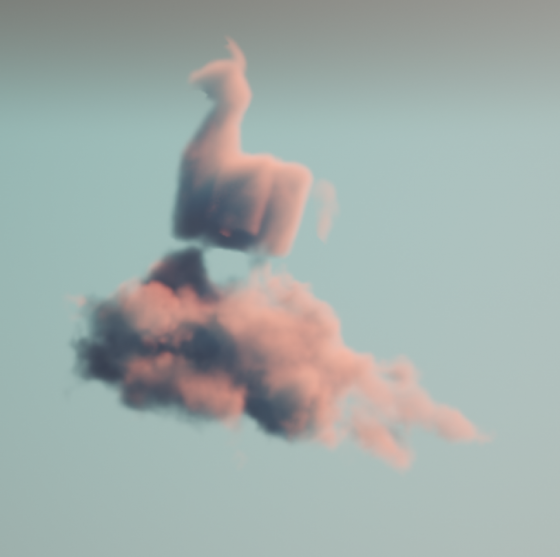
Making beautiful and feasible volumetric effects has been a trending topic for game development. Inspired by the Gears 5 tech talk and the good ol’ Guerrilla paper on cloudspaces, I decided to do my own take and created this fluffy dry ice fog using Volumetric Fog feature that comes with UE4.
https://twitter.com/Vuthric/status/1226257386131746817
This is done purely within Volumetric Fog and Volume Material systems, thus requires no low-level coding and supports various lighting feature within UE4.
Volumetric Fog
Volumetric Fog has been in Unreal Engine since 4.16. Comparing to custom volumetric raymarcher, which usually only supports one directional light and skylight, UE4 Volumetric Fog supports one Directional Light, any number of Point and Spot Lights, Skylight, all with various shadowing method support like static shadow, CSM, distance field soft shadow and DFAO. It also supports Volumetric Lightmaps and Particle Lights. it’s well embedded into the engine with good performance.

The major downsides include lacking IES support, doesn’t work with Ray Tracing and most importantly, no self-shadow or light scattering for performance reasons. Later we’ll learn some neat tricks to fake self-shadow as a workdaround.
Before Getting Our Hands Dirty
Before starting I need to make clear that what we are going to create is a pretty demanding visual effects. Volumetric fog is targeted for mainstream PCs/Consoles, but in order to express the detailed shapes of dense fog we need to crank up the parameters by quite a bit.
For the sake of demonstration I tuned up the quality by changing cvar:
r.VolumetricFog.GridPixelSize 4
Which costs ~4ms on a 2080Ti (1080p) for the final FX.
Default GridPixelSize value is 8. Half the value means there are 4x more voxels to render for the same screen resolution. And because we’ll do multiple texture sampling per voxel it costs even more. Final fog is about 8 times as much consuming than regular volumetric fog at high quality (as in the video); 2 times as much consuming at default quality.
It’s important that you understand this. For learning’s purpose, you can maximize the quality as long as your machine runs it smoothly.
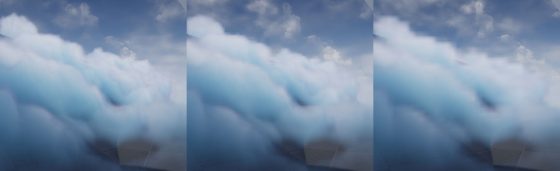
Click to zoom in
I’ll talk more about optimization in the last section of this article. You can tweak it to fit your needs but most importantly, after going through this project you’ll learn about great ways to control volumetric fog in 3D space, which may also be used on top of other VFX to achieve richer, thicker atmosphere.
Local Controls
Firstly you still need to setup your Exponential Height Fog actor and enable its Volumetric Fog option. Decrease the density to 0.00001 and change fog actor location to (0, 0, -9999999) if you don’t want global fog.
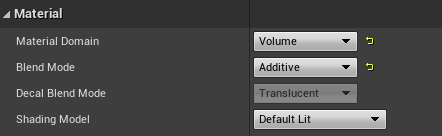
Materials using the Volume domain describe Albedo (color), Emissive, and Extinction (opacity) for a given area in space for the volumetric fog. For example you can create a 3D sphere with simple SphereMask by hooking up Absolute World Position, Object Bound to SphereMask node.
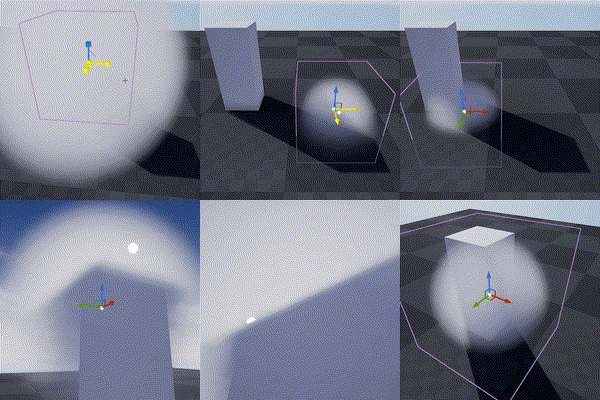
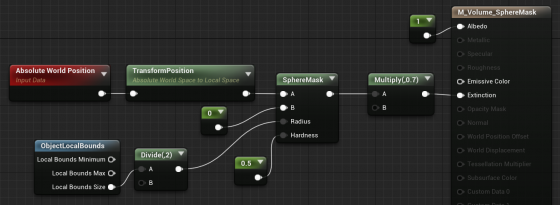
The material is applied to a cube mesh. Normals of the cube don’t need to be inverted. Two-sided material is not needed either. In fact it doesn’t even matter if it’s not a cube. Engine only uses the bounds of the mesh for if it uses Volume material.
Knowing this we can do all sorts of fun tricks. Let’s start with the basics:
3D Noise

The obvious step forward is adding 3D noise. Since multiple voxels are computed for every [GridPixelSize*GridPixelSize] pixel grid on screen. The Volume material needs to be fast. For the Noise node, Fast Gradient – 3D Texture option is our only bet here.
And we can easily get this low hanging fruit of a volume effect by using the material above:
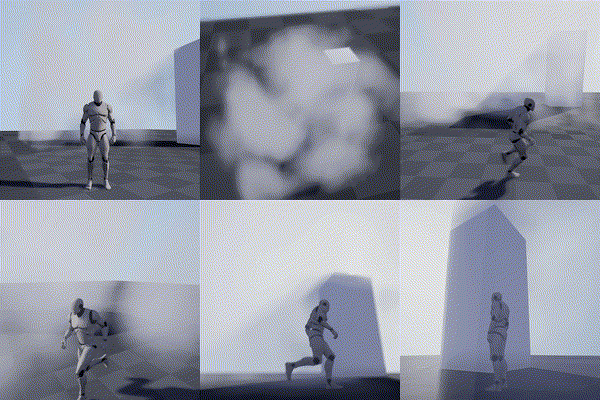
Fake Godrays
This section is not required for the fog effect we aim to achieve, but it’s a great example of using simple math to achieve nice looking and cost efficient results. In this awesome tutorial by Sjoerd De Jong from Epic, he mentioned a method to add artificial god rays which gives the light a lot of rich details.
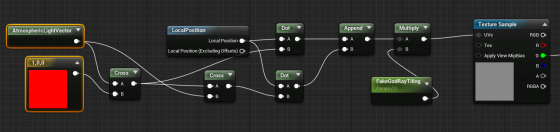
Basically you use cross operator to get two vectors that are perpendicular to the light vector and perpendicular to each other. Then use them as UV input for a perlin noise texture. This projects the 2D texture along the light direction:
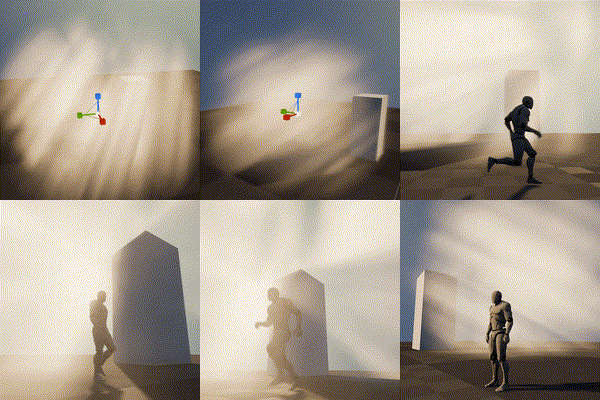
A more practical demonstration from my tech talk (link, it’s in Chinese):

Because I love giving badass names to my demos
Now you may notice the nice looking dense cloud movement on the ground. That’s was my first attempt at creating this effect 🙂

Dense Cloud
As mentioned earlier, dense Volumetric Fog doesn’t work very well because we lack self-shadowing, while on the bright side, it integrates well with engine lighting features. We can fake shadows in various ways then cover up the flaws with lighting and animation.
Here is a list of missions we need to accomplish:
- ‘Ground’ the volume to surface
- Create Cloud like patterns and behavior
- Fake self-shadow
- Achieve good enough performance so people have a chance to see it in you game
Distance Function
In the Gears 5 talk, Colin mentioned they generated heightmaps for their maps, which are then piped into the Volume Material to act as a mask. This basically says okay we got nice 3D cloud in the air but fade it out when it’s far away from the ground.
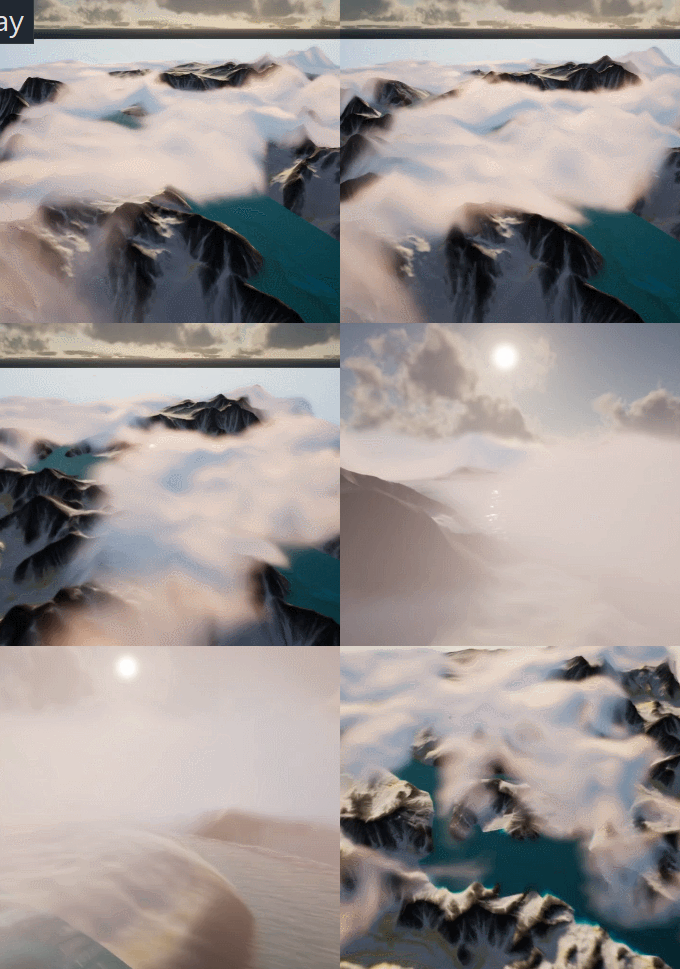
A quick example showing dense cotton candy blowing over mountain tops
For this article though, we are going to use Distance Field instead of heightmap for simplicity’s sake (heightmap is faster but custom tools are needed to generate them).
After turning it on. We can simply use Distance to Nearest Surface node to access global distance field data in the material graph:

Note that Global Distance Field only generates as far as 395.75 cm to any surface (balance between range and precision). So it’s doesn’t really work for huge scale FX like the mountain Cotton Candy (I simply used the landscape heightmap there).
A Brief on Volume Textures in UE4
Now we know how Volume Material works and how it can interact with the scene, the gracious time has come to talk about 3D textures. Unreal Engine 4 has added Volume Texture support since 4.21. It works by taking a 3D shape and slicing it into cross-sections, which are then placed into a grid on a 2D Texture. Volume Texture asset can automatically convert the 2D texture into a 3D one.
Volume Texture imported from Houdini
(Optional part, read if you are interested in VDB)
It’s also possible to feed a function into UVolumeTexture::UpdateSourceFromFunction() to read from VDB files directly. Here is an example I did a while back that imports a single VDB file into a Volume Texture asset.
Note: This is a very experimental test and it only supports older VDB files since I imported OpenVDB library from UE4 ProxyLODPlugins.
    auto QueryVoxel = [&](const int32 x, const int32 y, const int32 z, void* ret)
    {
        openvdb::Coord xyz(x + Start.X, y + Start.Y, z + Start.Z);

        if (TextureFormat == ETextureSourceFormat::TSF_G8)
        {
            uint8* const Voxel = static_cast<uint8*>(ret);
            Voxel[0] = accessor.getValue(xyz) * 256 * ValueScale;
        };
        if (TextureFormat == ETextureSourceFormat::TSF_RGBA16F)
        {
            half* const Voxel = static_cast<half*>(ret);
            Voxel[0] = accessor.getValue(xyz) * ValueScale;
            Voxel[1] = 0;
            Voxel[2] = 0;
            Voxel[3] = 0;
        }
        // Only listing two formats here
    };

    VolumeTexture->UpdateSourceFromFunction(QueryVoxel, End.X - Start.X, End.Y - Start.Y, End.Z - Start.Z, TextureFormat);
    VolumeTexture->MarkPackageDirty();

    return true;
We can choose which texture format we want to save as Volume Texture. Usually 8 bit per channel is good enough for volumetric FX.
This covers how to use one layer of static volume data. To make natural looking cloud of fog, we need to stack multiple layers of 3D noises with a strong art direction, not unlike how we fake water waves with 2D noises (as normal maps or height offset). It’s a very challenging task, fortunately this is a topic that has been experimented with by a lot of super awesome FX artists. I’ll try to sum up what I’ve learned in next sections.
Shaping The Cloud With 3D Noises
Author 3D Noises
There’re multiple ways to create 3D noises. I’m going to first talk about how to create them in Houdini, then introduce a way to generate them in UE4 (4.25 and later) directly.
The reason being, the process is more instinctive in Houdini, there are existing nodes designed specifically for this job. Previewing tweaks is better too. However if you’re not familiar with Houdini or want to keep the workflow fancier, the new Volumetrics plugin coming to 4.25 has legit tools to keep the process inside UE4 kitchen.
Create The Base Layer (with Houdini)
The most important noise layer that immediately yield great result for me is what Guerrilla Games calls Perlin-Worley noise.
As mentioned, Houdini is very powerful for these kind of job and comes with native periodic Perlin / Worley noise nodes. Here is the Volume Vop for periodic Perlin fractal noise:

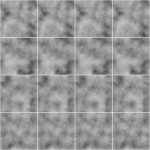
The for loop is a little tricky to use if you’re not familiar with it. Once you got that you can easily generated another periodic Worley fractal noise volume:

then multiply them together:
(You can do this inside a Cop net)
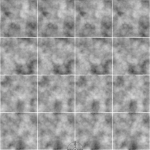
The first Perlin noise uses a very common technique called fBm (fractal Brownian motion), which basically means fractal — you combine noises with different frequencies together to get a more detailed noise while maintaining the macro shape.
Worley noise algorithm is pretty simple. For 3D noise, the voxel value is second shortest distance between the voxel scattered points in space. That gives us this fluffy visual characteristics. When mixed in the cloud volume it can either separate the volume in bubbly sections or give the edge some nice wispy details.
Combining with the distance function technique we mentioned before, the Perlin-Worley noise instantly gives you this clean and detailed look:
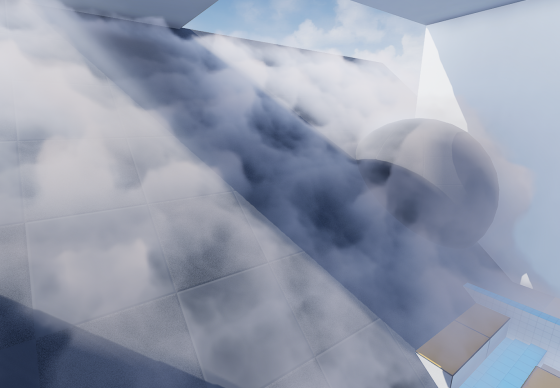
To sample Volume Texture, you treat them as 2D textures but instead of UV(float2) you feed in a UVW(float3) as coordinate in 3D space.
You can spot the consistent visual feature of Perlin noises, also the billow features from Worley noises here, which gives us a solid base shape for the cloud we’ll continue adding details to. Adding panning to the UVW input will instantly give you flowy results if the panning direction is not completely parallel to surface tangent.
Update 2020-07-01: Uploaded the .hip file since a lot of you folks are asking for it and the peer pressure is weighing me down. (actually .hiplc since I only have indie license on my WFH machine)
Create The Base Layer (within Unreal Engine 4)
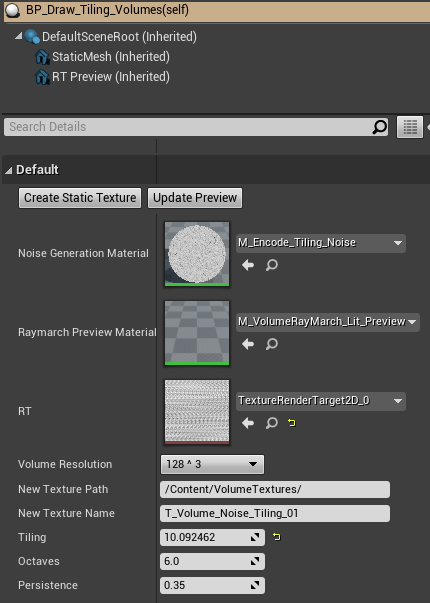
This is the alternative way to author 3D noises within UE4. This awesome Volumetrics plugin by Ryan Brucks is only available in dev-main branch at the time of writing. You can find BP_Draw_Tiling_volume under Plugins\Volumetrics\Content\Content\VolumeTextures\Blueprints
Usable is pretty straightforward. Click Create Static Texture button to instantly generate a uasset of that. You can dig inside and see how it works.
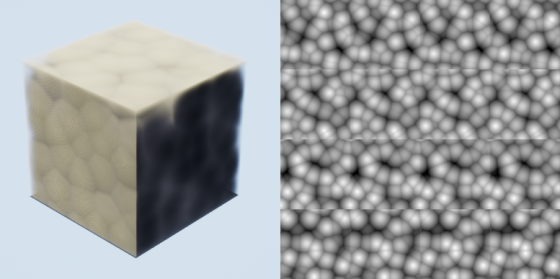
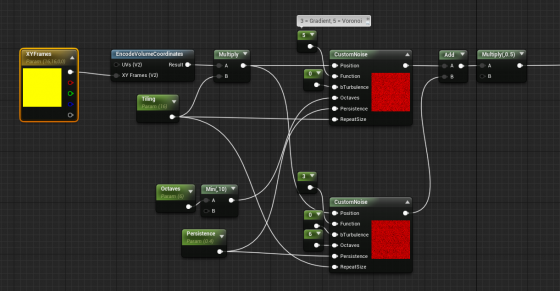
The core function here is M_Encode_Tiling_Noise, which describe the 3D texture it’s going to generate. It doesn’t come with the Perlin-Worley noise as mentioned but we can easily modify it to our heart’s content.
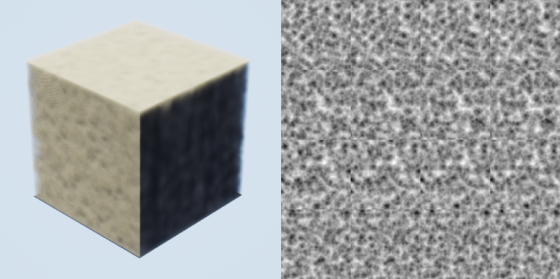
The custom node takes inputs and generates 3D noises, while Function parameter describles the noise type. Default is one gradient 3D noise as output. Here I add a Gradient (Perlin) noise and Voronoi (Worley) noise together then multiply it by 0.5. Hit Create Static Texture button we can achieve similar result as the Houdini one.
Stacking Noises To Replicate Dry Ice Fog Movement
As mentioned before. Worley noise works nicely for both macro and detail shaping. Similar to 2D textures, we can add/multiply layers of 3D noises with different patterns and panning speed to achieve a more dynamic result. To demonstrate this clearly, here’s 2 layers of 2D
panning noises multiplied:
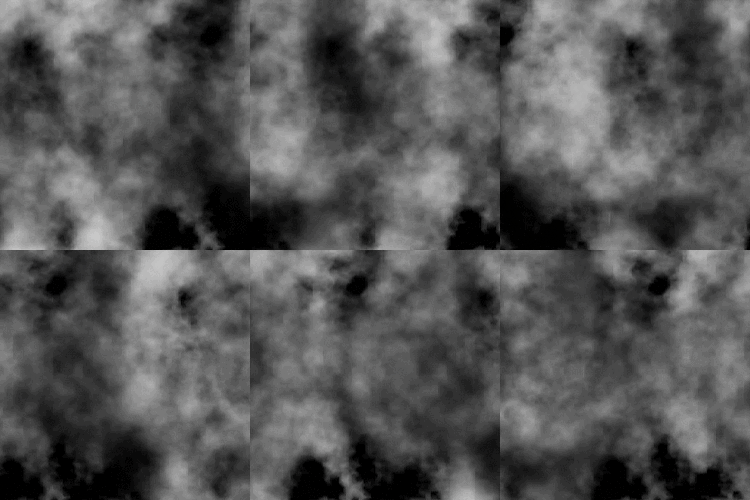
We want similar things in 3D so the fog will appear to be flowing. However, 3D noises are very expensive. For example 512^3 volume texture roughly equals 11.5k*11.5k in 2D and currently UE4 doesn’t support 3D texture streaming. Sampling such large textures multiple times, in multiple voxels, for every [GridPixelSize*GridPixelSize] pixels on screen takes a big toll on the performance.
A better strategy is stacking 3 layers of lower resolution 3D noises (128^3 for example) instead of 2 high resolution. And because the 3 layers have aggressively larger scale, they make up for low resolution:
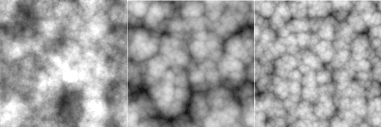

It’s not as detailed, but the extra layer adds a lot more complexity to it so we don’t see any repeated patterns.
The 3 layers of 3D noises are encoded into RGB channels of a Volume Texture respectively:

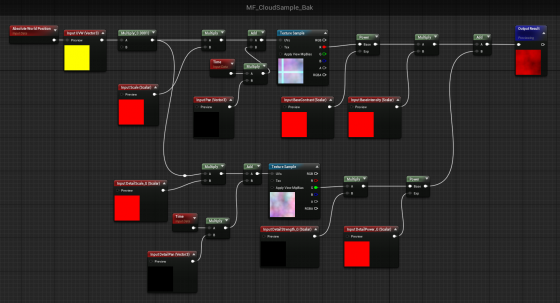
With a little tweaking, you’ll manager to get this:
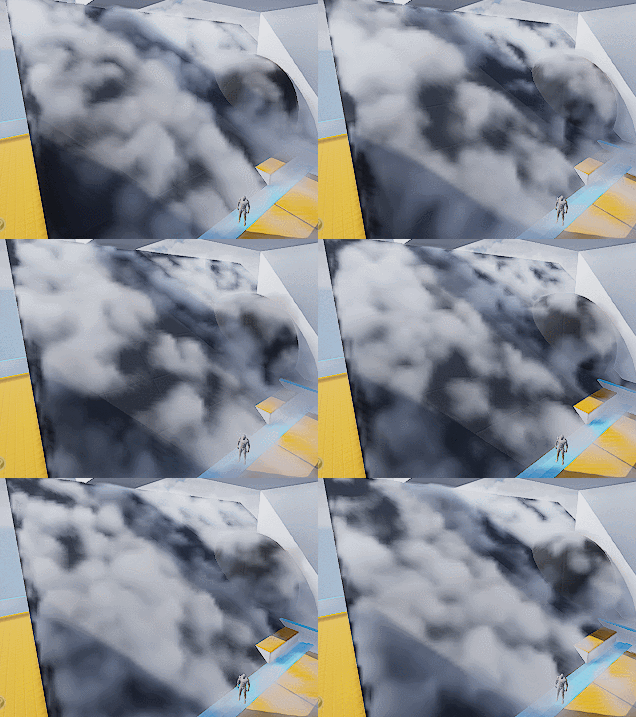
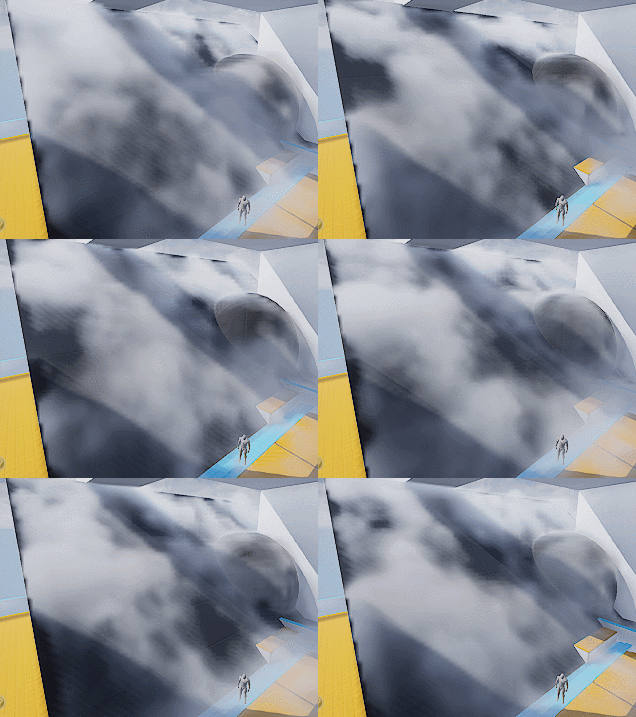
Which looks like absolutely nothing. Here begins the journey of parameters tweaking. Consider this a triumph for your tech art skills. The 3D noise behavior will start making sense when you start hallucinating.
A tip I can give though is to start simple and make sure you get a good base to work with. I spent a lot of time experimenting with the noises and trying to replicate dry ice fog movement, with only two layers of 3D textures (The R and G channels of our volume texture).
Also it’s important to tilt the panning direction away from surface tangent a little. It will result in a more dynamic look since distance field is constantly trimming the 3D noise.
Then add a little details:
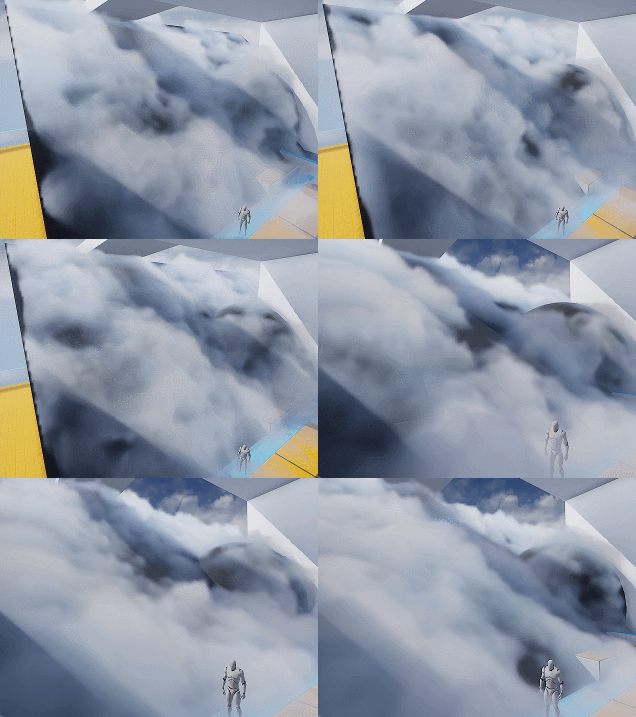
Wait what? I hear you. This feels like a ‘draw the rest of the owl’ situaltion. But the differences between the two are only two changes:
- Two more layers of noise. One of them is B channel of the volume texture, used similar to G channel. The other one is a fine tune ‘modifier’ to add refined wispy edges.
- Shadows. Offset shadow and DFAO.
Which leads to our next sections.
Add Detail – Wispy Edges
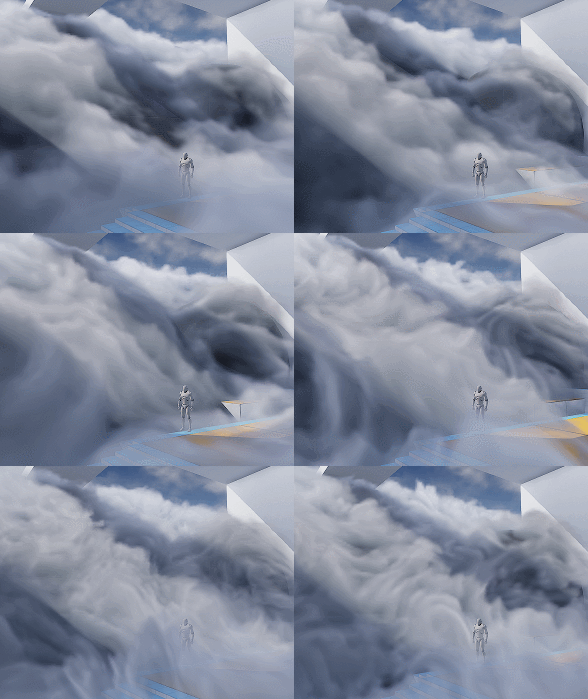
After adding another layer of Worley noise (B channel) you’ll can get something like the left picture (minus shadowing which I’ll cover later).

The overall shape is good but still lacks details. You can then add another layer of noise to A channel, or just reuse other channel to add in high frequency details (middle picture). The pattern is very repetitive but since the moving shape is already very rich, it won’t be noticeable.
Then we want to soften up the details near the ground, since dry ice fog tends to be more volatile the higher it goes (look up videos on youtube), and the slicing artifacts appear worse if the contrast is high near the ground:
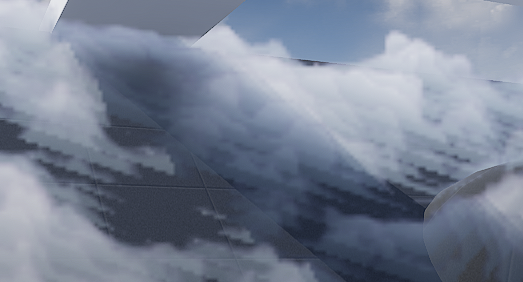
It’s fairly easy to implement the detail fading, just adjust the detail intensity according to DF value (with a power function to adjust contrast). Result is the picture on the right.
Add Detail – Curl Noise (Optional)
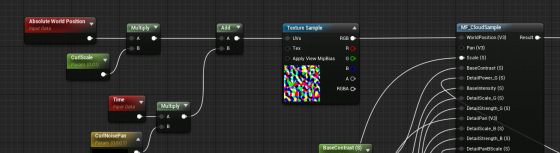
Another great way to add more character to the fog is using divergence-free curl noise to distort the space a little. It gives you stylized curvy dynamics if you cramp it up. Or add some extra curvy flavor if you can afford the extra texture sampling.
There is one under Volumetrics plugin/Content/VolumeTextures/Textures/VT_CurlNoise
Add world position with it before feeding into sampling function.
Shading
Shadow – Offset Shadow
Firstly, volumetric fog doesn’t really support self-shadowing. What we can do is darken the color of input Albedo in the Volume material to fake it. There are downsides, mainly not looking quite correct when inside actual environmental shadows (because we’re still faking shadows for directional light that doesn’t shrine through here) , which can be dealt with by raymarching scene distance field. But let’s leave that for another day.
Offset shadow, in its simplest form, is this:

The text feels solid and leaves a drop shadow on the canvas. Now if the shadow is inside the text and get blurred a little bit we get a softer shadow, which makes it look 3D.

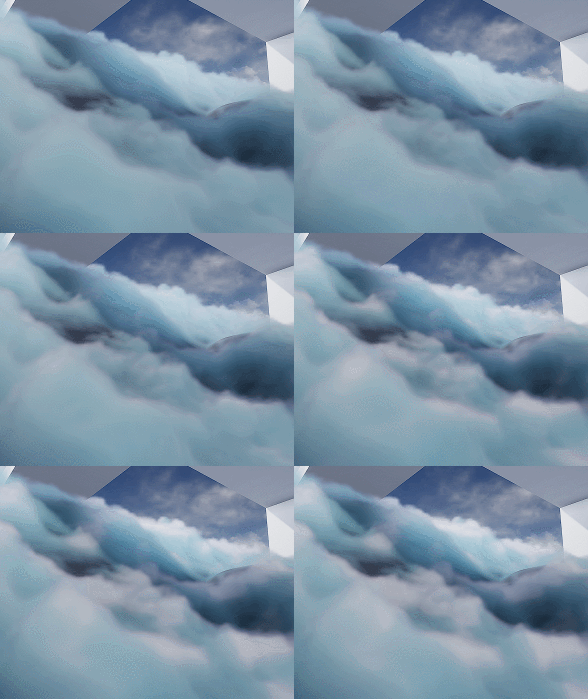
This is exact what we’ll do to the fog. We offset the input World Position A a little toward the main directional light (World Position B) and sample MF_CloudSample again. If B has density of 0, it means there is nothing blocking light to A. A should be colored as a bright color. If B has density > 0, we darken the Albedo of A by how dense B is.

Since UE4 Volumetric Fog implementation already includes temporal jitter, the line between lighted and shadowed isn’t that obvious. You can also adjust the offset length to get a more natural look.
Offset Jitter
Aside from this, I came up with the UseJitteredOffsetShadow method here. Basically you jitter the offset length of every voxel between a range. Temporal super sampling will then smooth it out. There are some artifacts but the result looks quite good. Jitter code inside the Custom Code:
int3 randpos = int3(WorldPosition.xy, View.StateFrameIndexMod8);<br>float rand =float(Rand3DPCG16(randpos).x) / 0xffff;<br>return rand;
Shadow – DFAO
Another shadowing approach that does wonders is distance field ambient occlusion. If you don’t have distance field enabled you can use heightmap as alternative.
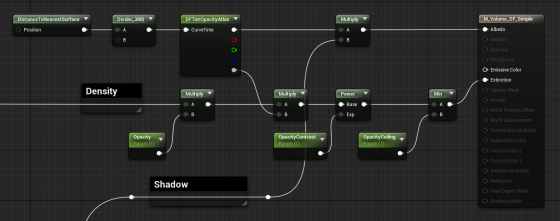
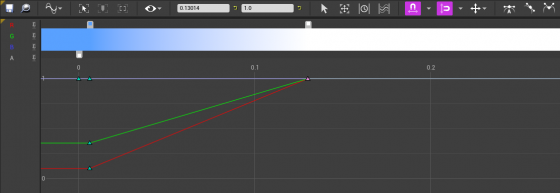
The implementation is simple — tint Albedo darker the closer it is to nearest surface. The Curve Atlas node in the graph above is an awesome engine feature that has come into existence for a while. It automatically generates a small texture from the color curve you edited, including RGBA channel. This makes adjust the DFAO tint and DF opacity influence much faster and more instinctive.
Optimization
I’m still experimenting with ideas like pre-baked scattering, and more efficient way to mask out the empty voxels. For now I’ll mention a few key points.
Since DFAO does a pretty good job in making the cloud cluster distinguishable, you may consider ditching offset shadow since that doubles the sampling cost.
It’s also very important that you understand some of the cvars config for volumetric fog. Volumetric fog is rendered into a 3D texture that will be stretched to fill your vision cone. The depth can be adjusted in ExponentialHeightFog actor – Volumetric Fog – View Distance.
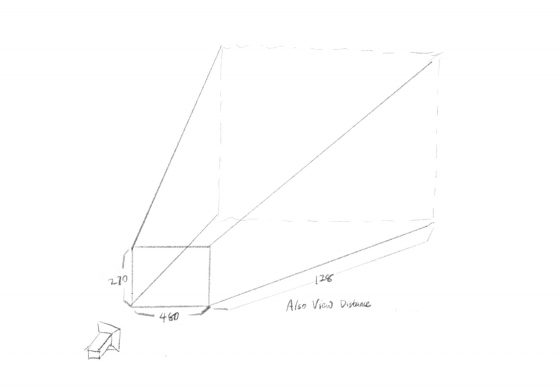
The 3D texture for this project is 480x270x128 (@1080p), as you can see in GPU Visualizer (hotkey ctrl+shift+, )
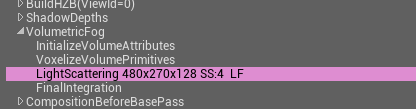
Why? Let’s see the cvars:
r.VolumetricFog.GridSizeZ 128 (default 128)
Is the resolution along the camera depth (Z) axis.
r.VolumetricFog.GridPixelSize 4 (default 8)
Is the screen pixel size per voxel in XY plane. I set it to 4, which means at 1920×1080 resolution, the XY resolution is 480×270.
Click to zoom in
These are the main parameters you can adjust to trade quality for performance very efficiently. Increase gird pixel size to 8 will make it 4x faster.
Also Decrease grid size z to 64 will make it 2x faster, but this will probably result in flickering artifacts. You can try increase
r.VolumetricFog.HistoryWeight (default 0.9)
to reduce the flickering, but the movement will appear more blurred in return. ExponentialHeightFog actor – Volumetric Fog – View Distance can also be decreased to increase quality along Z axis, at the sacrifice of rendering distance.
Finally an optimization I did that yielded noticeable result is using DF value to determine if we should sample textures and calculate output for current voxel at all. Basically you can’t do shader dynamic branching with the If node in material graph, but you can in Custom code. It’s possible to take an Alpha input calculated from distance field, to essentially avoid unnecessary texture sampling operations (and other operations) if current voxel is empty.
[branch]

// Simplified code. Ideally we should immigrate most calculations from the material graph into the if scope

[branch]
if(DF < Alpha)
{
  return float4(
    Texture3DSample(Tex, TexSampler, UVW0).r,
    Texture3DSample(Tex, TexSampler, UVW1).g,
    Texture3DSample(Tex, TexSampler, UVW2).b,
    Texture3DSample(Tex, TexSampler, UVW3).a
  );
}
else
{
   return float4(0.f, 0.f, 0.f, 0.f);
};
1win actualizare [url=http://1win39929.help]http://1win39929.help[/url]
mostbet сайт [url=https://mostbet33907.online]mostbet сайт[/url]
I’ve got the scars to prove it. Then you show up at the lot. Different car waiting — scratches everywhere, smells like an ashtray, and that “amazing price”? Doesn’t include the mandatory $400 cleaning fee or the $30 per day toll pass you can’t waive. Eight years in South Florida and these clowns still almost get me. When you need a proper luxury car rental miami. anyone who’s waited for an Uber in August understands. leather seats that won’t weld themselves to your thighs in July. most are shiny turds with five-star fake reviews on Google Maps. Finally found one outfit that doesn’t play stupid games. Here’s the only honest source for premium wheels across South Florida
rolls royce cullinan for rent near me [url=https://luxury-car-rental-miami-8.com]rolls royce cullinan for rent near me[/url] Yeah parking in South Beach will cost you a nice bottle of wine — but that’s the Miami tax. Anyway glad there’s at least one straight operator left in this rental circus.
Seriously, the amount of garbage “luxury” deals here is astonishing. You see a sweet ride online — clean spec, fair price, looks legit. Plus they want a $2000 hold on your debit card. Fool me five times? Actually yeah, Miami keeps fooling everyone. miami car rental luxury — don’t just grab the cheapest option on Kayak. ask anyone who’s tried Ubering across the 305 during rush hour. leather seats that don’t fuse to your skin in August. I’ve gone through maybe 30 rental companies across Dade, Broward, and Palm Beach. Finally found one outfit that actually delivers what’s in the listing. Here’s the only honest broker for premium vehicles across South Florida
exotic car hire [url=https://luxury-car-rental-miami-5.com]exotic car hire[/url] Yeah finding parking in Wynwood will test your patience — but that’s not on them. drive safe and maybe decline that “premium roadside” upsell — it’s always a scam.
Appreciate that you did not pad this with fluff to hit a word count, the post says what it needs to say and stops, and a look at focusalignmenthub did the same, brevity here feels intentional not lazy which is a distinction many writers miss completely sometimes when they are working under deadlines.
Glad I stumbled across this post, the explanations actually make sense without needing background knowledge to follow along, and after a stop at actiontrajectory the same was true there, no assumptions about the reader just clear writing that anyone can understand from the first line right through to the end.
1win progressive jackpot [url=https://www.1win47293.help]https://www.1win47293.help[/url]
1win withdrawal not received [url=https://1win47293.help/]https://1win47293.help/[/url]
Well done, the kind of post that makes you slow down and actually read instead of skimming for keywords, and a look at autumncovecraftcollective kept me reading carefully too, that is a sign of writing that has been crafted rather than churned out for an algorithm to see today and tomorrow.
Okay folks gather around because this Miami rental nightmare needs to be discussed. Then you show up and it’s a whole different story. Different car, scratches all over, and that “all-inclusive” price? Yeah that didn’t include insurance, fees, or the mandatory cleaning charge. I’ve lived here for years and still get burned occasionally. luxury car for rent. Miami without proper wheels is basically a hostage situation. leather seats that don’t fuse to your skin in August. I’ve gone through maybe 30 rental companies across Dade, Broward, and Palm Beach. no games, no bait-and-switch, no hidden asterisks. check availability before spring break crowds wipe them out:
suv rental near me [url=https://luxury-car-rental-miami-5.com]https://luxury-car-rental-miami-5.com[/url] Yeah finding parking in Wynwood will test your patience — but that’s not on them. Anyway glad there’s at least one straight shooter left in this rental jungle.
Alright, real talk about the Miami rental game — it’s a straight-up jungle out here. Then you show up at the lot. Plus they freeze $2500 on your card for a week. Fool me eight times? That’s just another Tuesday in the 305. luxury car rental miami florida. Miami without decent wheels is basically a hostage situation. leather seats that won’t weld themselves to your thighs in July. I’ve run through maybe 45 rental companies across Dade, Broward, and Monroe. what you book is what shows up, no surprises, no fine print nightmares. Here’s the only honest source for premium wheels across South Florida
mercedes g wagon rental near me [url=https://luxury-car-rental-miami-8.com]mercedes g wagon rental near me[/url] also bring serious shades unless you enjoy driving straight into the sun like a zombie. drive safe and absolutely skip that “windshield protection” upsell — pure profit for them, zero value for you.
Appreciate that you did not pad this with fluff to hit a word count, the post says what it needs to say and stops, and a look at erminecobble did the same, brevity here feels intentional not lazy which is a distinction many writers miss completely sometimes when they are working under deadlines.
1win android хатогӣ [url=1win52867.help]1win52867.help[/url]
Picked up a couple of new ideas here that I can actually try out, and after my visit to momentumthroughclarity I have even more notes saved, this is the kind of resource that pays you back for the time you spend on it which is rare to come across in this corner of the web.
mostbet бездепозитный бонус [url=https://mostbet33907.online]https://mostbet33907.online[/url]
Will recommend this to a couple of friends who have been asking about this exact topic, and after directionalflow I have even more reason to do so, the kind of site that earns word of mouth rather than chasing it through aggressive marketing or paid placements is always a treat to find online.
High quality writing, no marketing speak and no buzzwords that mean nothing, and a stop at barniguana kept that going, simple direct content that actually communicates something is harder to find than it should be and this is one of the rare places that gets it right consistently across many different posts.
Liked the post enough to read it twice and the second read found new things, and a stop at burstferret similarly rewarded the second look, content with hidden depths that only reveal themselves on careful rereading is the rare kind that earns lasting respect rather than fleeting first impressions only briefly held.
Quietly building a case in my head for why this site deserves more attention than it currently seems to receive, and a look at gentianfawn reinforced the case, the gap between quality and recognition is a recurring frustration in independent online content and this site is one of the cases that seems particularly egregious to me today.
чӣ гуна кэшбэк 1win гирифтан [url=http://1win52867.help/]http://1win52867.help/[/url]
Liked the post enough to read it twice and the second read found new things, and a stop at growthframework similarly rewarded the second look, content with hidden depths that only reveal themselves on careful rereading is the rare kind that earns lasting respect rather than fleeting first impressions only briefly held.
Everyone loves the thrill of the game and the chance to win big money! Now, people in UK have the opportunity to play at a casino How to register on Britsino and score huge payouts instantly. To find out all the details, stick around and read our review!
Well done, the writing is professional without being stiff, and the topic is treated with care, and a look at hedgecamel reflected that approach, the kind of site I would point a colleague to if they asked for a reliable starting point on this topic in the future without any hesitation at all.
Bookmark added in three places to make sure I do not lose the link, and a look at condoraspen got the same redundant treatment, sites I am afraid to lose are the rare keepers and this is clearly one of them based on what I have read so far across this and a couple of related posts.
aviator ping yüksək [url=www.aviator85462.help]www.aviator85462.help[/url]
мостбет валюта сом [url=www.mostbet33907.online]мостбет валюта сом[/url]
The conclusions felt earned rather than tacked on at the end like an afterthought, and a look at calmcovecraftcollective kept that careful structure going, you can tell when a writer has thought about the shape of their post versus just letting it ramble out and hoping for the best at the end which most do.
Came away with a slightly better mental model of the topic than I started with, and a stop at ferretglider sharpened that further, content that improves the reader thinking apparatus rather than just dumping facts into it is the rare kind I genuinely value and seek out when I have time to read carefully.
Been there, done that, got the overpriced tow truck receipt. Swear some of these “luxury” fleets should be in a museum. You land at MIA, tired, grab an Uber to the rental office, and bam — surprise $1500 hold on your card. No thanks, I’m too old for this nonsense. those guys are the worst of the bunch. any local will tell you the same thing. Coral Gables brunch, South Beach night run, or a spontaneous Everglades detour — AC must be ice cold and unlimited miles. I’ve tested maybe 25 rental outfits across Dade and Broward. what you book is what you get, period. rates change daily with demand so don’t sleep on it:
exotic car hire miami [url=https://luxury-car-rental-miami-4.com]exotic car hire miami[/url] also bring polarized shades unless you enjoy driving blind into sunset. Anyway at least there’s one honest rental joint left in this town.
мостбет как вывести выигрыш [url=https://www.mostbet33907.online]мостбет как вывести выигрыш[/url]
1win Корти миллӣ [url=http://1win52867.help]1win Корти миллӣ[/url]
Just want to flag that this was useful and not bury the appreciation in caveats, and a look at erminecondor earned the same direct praise, recognising good work without hedging it with criticism is something I try to practice because over qualified compliments tend to read as backhanded and miss the point sometimes.
As I website possessor I believe the content material here is rattling fantastic , appreciate it for your hard work. You should keep it up forever! Best of luck.
1win сомонӣ хуруҷ [url=1win52867.help]1win сомонӣ хуруҷ[/url]
Seriously, the amount of garbage “luxury” deals here is astonishing. Then you show up and it’s a whole different story. Different car, scratches all over, and that “all-inclusive” price? Yeah that didn’t include insurance, fees, or the mandatory cleaning charge. I’ve lived here for years and still get burned occasionally. luxury car rental miami fl. Miami without proper wheels is basically a hostage situation. leather seats that don’t fuse to your skin in August. I’ve gone through maybe 30 rental companies across Dade, Broward, and Palm Beach. Finally found one outfit that actually delivers what’s in the listing. Here’s the only honest broker for premium vehicles across South Florida
escalade rental near me [url=https://luxury-car-rental-miami-5.com]https://luxury-car-rental-miami-5.com[/url] Yeah finding parking in Wynwood will test your patience — but that’s not on them. Anyway glad there’s at least one straight shooter left in this rental jungle.
Top quality material, deserves more attention than it probably gets, and a look at clarityenablesgrowth reflected the same effort across the site, a hidden gem in the modern web where most attention goes to whoever shouts loudest rather than whoever actually delivers the best content for their readers without much marketing fanfare.
aviator promo kod harada yazılır [url=http://aviator85462.help]http://aviator85462.help[/url]
I’ve got the scars to prove it. Then you show up at the lot. Plus they freeze $2500 on your card for a week. Eight years in South Florida and these clowns still almost get me. luxury car for rent. anyone who’s waited for an Uber in August understands. leather seats that won’t weld themselves to your thighs in July. I’ve run through maybe 45 rental companies across Dade, Broward, and Monroe. what you book is what shows up, no surprises, no fine print nightmares. Here’s the only honest source for premium wheels across South Florida
rent cadillac escalade near me [url=https://luxury-car-rental-miami-8.com]rent cadillac escalade near me[/url] Yeah parking in South Beach will cost you a nice bottle of wine — but that’s the Miami tax. drive safe and absolutely skip that “windshield protection” upsell — pure profit for them, zero value for you.
Vipluck vipluck casino vergleich ist ein modernes Online-Casino mit großen Bonusangeboten und schnellen Auszahlungen. Spieler wählen Vipluck wegen der vielen Slots, sicheren Zahlungen und positiven Vipluck Casino Erfahrungen.
Time spent here today felt productive in the way that good reading sessions sometimes do, and a stop at butteaspen extended that productive feeling across the rest of the morning, the difference between productive reading and merely passing time is real and this site is consistently on the productive side for me lately.
1win login Republica Moldova [url=1win39929.help]1win39929.help[/url]
Closed it feeling slightly more competent in the topic than I started, and a stop at opalrivergoodsroom reinforced that competence boost, real learning is rare in casual online reading but it does happen sometimes and this site managed to make it happen for me today which is genuinely worth pausing to acknowledge.
Looking forward to seeing what gets published next month, and a look at growthengineered extended that anticipation across the broader site, finding myself looking forward to a sites future content rather than just consuming its existing content is a stronger commitment level than I usually reach with new finds and this site triggered that.
Beats most of the alternatives on the topic by a noticeable margin, and a look at geysercoyote did not change that at all, this is one of the better corners of the open internet for this kind of content and I am glad I clicked through rather than skipping past quickly like I usually do.
бк 1вин [url=https://cont.ws/@kekswin365/3291344]бк 1вин[/url]
Okay folks gather around because this Miami rental nightmare needs to be discussed. Then you show up and it’s a whole different story. Plus they want a $2000 hold on your debit card. I’ve lived here for years and still get burned occasionally. luxury car rental miami fl. ask anyone who’s tried Ubering across the 305 during rush hour. leather seats that don’t fuse to your skin in August. most are smoke and mirrors with decent SEO. no games, no bait-and-switch, no hidden asterisks. check availability before spring break crowds wipe them out:
exotic cars miami florida [url=https://luxury-car-rental-miami-5.com]exotic cars miami florida[/url] also bring quality shades unless you enjoy driving into a nuclear flare every evening. Anyway glad there’s at least one straight shooter left in this rental jungle.
I’ve got the scars to prove it. Then you show up at the lot. Plus they freeze $2500 on your card for a week. Eight years in South Florida and these clowns still almost get me. luxury car for rent. anyone who’s waited for an Uber in August understands. leather seats that won’t weld themselves to your thighs in July. most are shiny turds with five-star fake reviews on Google Maps. Finally found one outfit that doesn’t play stupid games. Here’s the only honest source for premium wheels across South Florida
miami luxury car rental [url=https://luxury-car-rental-miami-8.com]miami luxury car rental[/url] Yeah parking in South Beach will cost you a nice bottle of wine — but that’s the Miami tax. Anyway glad there’s at least one straight operator left in this rental circus.
melbet stream live [url=http://melbet42815.help/]http://melbet42815.help/[/url]
starz888 [url=vikagold.com/888starz-%d9%85%d8%b5%d8%b1-%d9%83%d8%a7%d8%b2%d9%8a%d9%86%d9%88-%d8%a3%d9%88%d9%86%d9%84%d8%a7%d9%8a%d9%86-%d9%88%d9%85%d8%b1%d8%a7%d9%87%d9%86%d8%a7%d8%aa-%d8%b1%d9%8a%d8%a7%d8%b6%d9%8a%d8%a9-%d9%85]https://vikagold.com/888starz-%d9%85%d8%b5%d8%b1-%d9%83%d8%a7%d8%b2%d9%8a%d9%86%d9%88-%d8%a3%d9%88%d9%86%d9%84%d8%a7%d9%8a%d9%86-%d9%88%d9%85%d8%b1%d8%a7%d9%87%d9%86%d8%a7%d8%aa-%d8%b1%d9%8a%d8%a7%d8%b6%d9%8a%d8%a9-%d9%85/[/url]
Alright listen up because I’m about to save you a massive headache. Swear some of these “luxury” fleets should be in a museum. You land at MIA, tired, grab an Uber to the rental office, and bam — surprise $1500 hold on your card. No thanks, I’m too old for this nonsense. luxury car rental miami fl. any local will tell you the same thing. leather that doesn’t glue to your legs in July heat. I’ve tested maybe 25 rental outfits across Dade and Broward. Finally stumbled on one that doesn’t play games. rates change daily with demand so don’t sleep on it:
miami luxury car rentals [url=https://luxury-car-rental-miami-4.com]miami luxury car rentals[/url] Yeah parking in Brickell will cost you a small mortgage — but that’s city life. drive safe and maybe pass on that overpriced roadside assistance add-on.