Summary
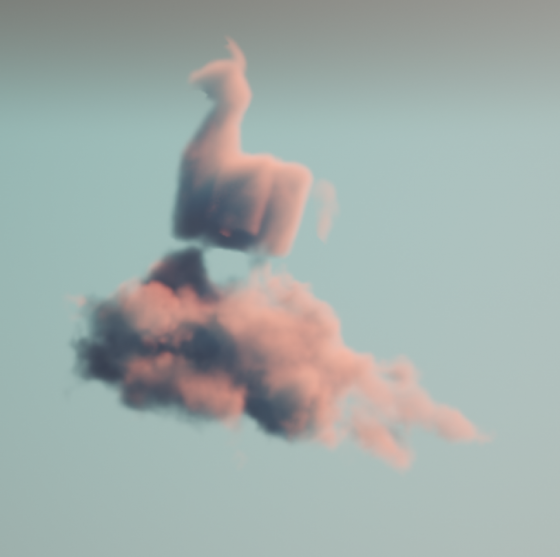
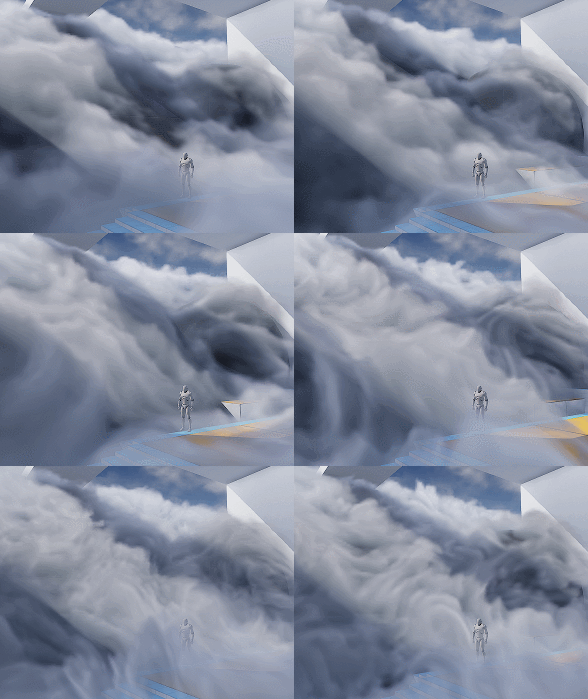
Making beautiful and feasible volumetric effects has been a trending topic for game development. Inspired by the Gears 5 tech talk and the good ol’ Guerrilla paper on cloudspaces, I decided to do my own take and created this fluffy dry ice fog using Volumetric Fog feature that comes with UE4.
https://twitter.com/Vuthric/status/1226257386131746817
This is done purely within Volumetric Fog and Volume Material systems, thus requires no low-level coding and supports various lighting feature within UE4.
Volumetric Fog
Volumetric Fog has been in Unreal Engine since 4.16. Comparing to custom volumetric raymarcher, which usually only supports one directional light and skylight, UE4 Volumetric Fog supports one Directional Light, any number of Point and Spot Lights, Skylight, all with various shadowing method support like static shadow, CSM, distance field soft shadow and DFAO. It also supports Volumetric Lightmaps and Particle Lights. it’s well embedded into the engine with good performance.

The major downsides include lacking IES support, doesn’t work with Ray Tracing and most importantly, no self-shadow or light scattering for performance reasons. Later we’ll learn some neat tricks to fake self-shadow as a workdaround.
Before Getting Our Hands Dirty
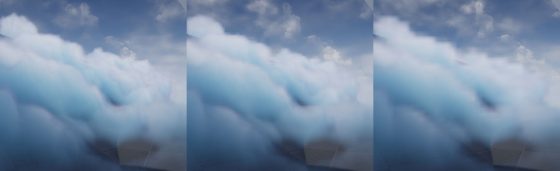
Before starting I need to make clear that what we are going to create is a pretty demanding visual effects. Volumetric fog is targeted for mainstream PCs/Consoles, but in order to express the detailed shapes of dense fog we need to crank up the parameters by quite a bit.
For the sake of demonstration I tuned up the quality by changing cvar:
r.VolumetricFog.GridPixelSize 4
Which costs ~4ms on a 2080Ti (1080p) for the final FX.
Default GridPixelSize value is 8. Half the value means there are 4x more voxels to render for the same screen resolution. And because we’ll do multiple texture sampling per voxel it costs even more. Final fog is about 8 times as much consuming than regular volumetric fog at high quality (as in the video); 2 times as much consuming at default quality.
It’s important that you understand this. For learning’s purpose, you can maximize the quality as long as your machine runs it smoothly.
Click to zoom in
I’ll talk more about optimization in the last section of this article. You can tweak it to fit your needs but most importantly, after going through this project you’ll learn about great ways to control volumetric fog in 3D space, which may also be used on top of other VFX to achieve richer, thicker atmosphere.
Local Controls
Firstly you still need to setup your Exponential Height Fog actor and enable its Volumetric Fog option. Decrease the density to 0.00001 and change fog actor location to (0, 0, -9999999) if you don’t want global fog.
Materials using the Volume domain describe Albedo (color), Emissive, and Extinction (opacity) for a given area in space for the volumetric fog. For example you can create a 3D sphere with simple SphereMask by hooking up Absolute World Position, Object Bound to SphereMask node.
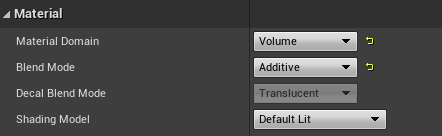
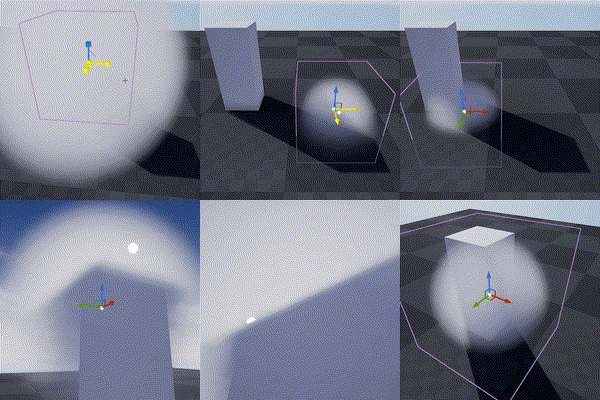
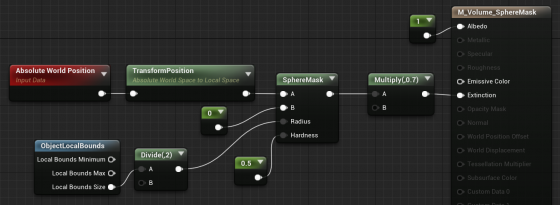
The material is applied to a cube mesh. Normals of the cube don’t need to be inverted. Two-sided material is not needed either. In fact it doesn’t even matter if it’s not a cube. Engine only uses the bounds of the mesh for if it uses Volume material.
Knowing this we can do all sorts of fun tricks. Let’s start with the basics:
3D Noise

The obvious step forward is adding 3D noise. Since multiple voxels are computed for every [GridPixelSize*GridPixelSize] pixel grid on screen. The Volume material needs to be fast. For the Noise node, Fast Gradient – 3D Texture option is our only bet here.
And we can easily get this low hanging fruit of a volume effect by using the material above:
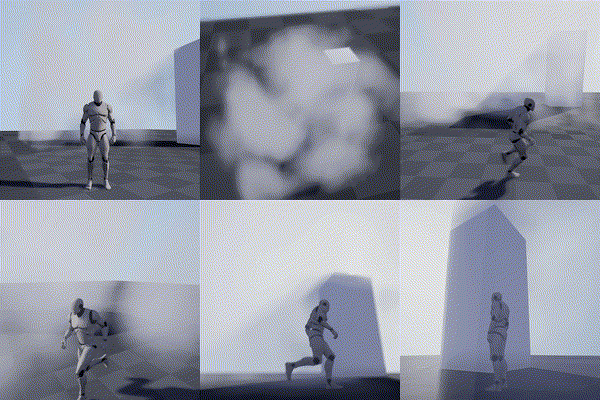
Fake Godrays
This section is not required for the fog effect we aim to achieve, but it’s a great example of using simple math to achieve nice looking and cost efficient results. In this awesome tutorial by Sjoerd De Jong from Epic, he mentioned a method to add artificial god rays which gives the light a lot of rich details.
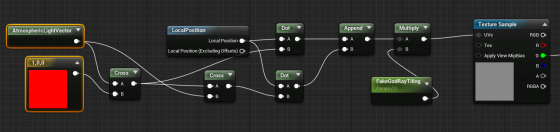
Basically you use cross operator to get two vectors that are perpendicular to the light vector and perpendicular to each other. Then use them as UV input for a perlin noise texture. This projects the 2D texture along the light direction:
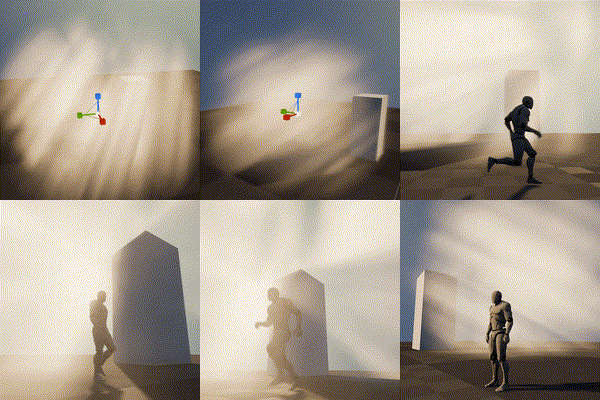
A more practical demonstration from my tech talk (link, it’s in Chinese):

Because I love giving badass names to my demos
Now you may notice the nice looking dense cloud movement on the ground. That’s was my first attempt at creating this effect 🙂

Dense Cloud
As mentioned earlier, dense Volumetric Fog doesn’t work very well because we lack self-shadowing, while on the bright side, it integrates well with engine lighting features. We can fake shadows in various ways then cover up the flaws with lighting and animation.
Here is a list of missions we need to accomplish:
- ‘Ground’ the volume to surface
- Create Cloud like patterns and behavior
- Fake self-shadow
- Achieve good enough performance so people have a chance to see it in you game
Distance Function
In the Gears 5 talk, Colin mentioned they generated heightmaps for their maps, which are then piped into the Volume Material to act as a mask. This basically says okay we got nice 3D cloud in the air but fade it out when it’s far away from the ground.
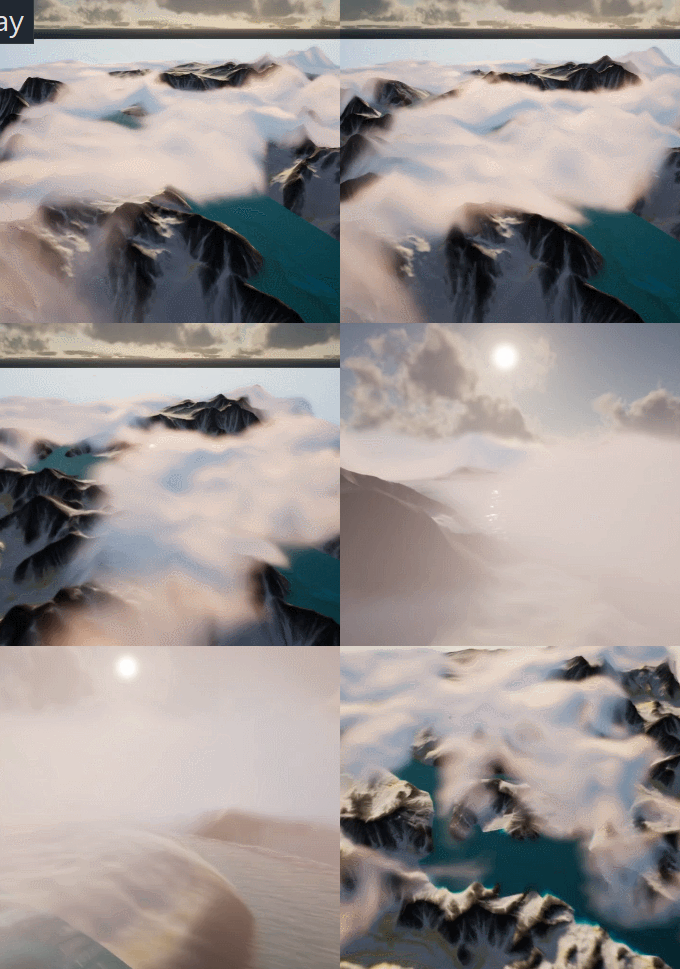
A quick example showing dense cotton candy blowing over mountain tops
For this article though, we are going to use Distance Field instead of heightmap for simplicity’s sake (heightmap is faster but custom tools are needed to generate them).
After turning it on. We can simply use Distance to Nearest Surface node to access global distance field data in the material graph:

Note that Global Distance Field only generates as far as 395.75 cm to any surface (balance between range and precision). So it’s doesn’t really work for huge scale FX like the mountain Cotton Candy (I simply used the landscape heightmap there).
A Brief on Volume Textures in UE4
Now we know how Volume Material works and how it can interact with the scene, the gracious time has come to talk about 3D textures. Unreal Engine 4 has added Volume Texture support since 4.21. It works by taking a 3D shape and slicing it into cross-sections, which are then placed into a grid on a 2D Texture. Volume Texture asset can automatically convert the 2D texture into a 3D one.
Volume Texture imported from Houdini
(Optional part, read if you are interested in VDB)
It’s also possible to feed a function into UVolumeTexture::UpdateSourceFromFunction() to read from VDB files directly. Here is an example I did a while back that imports a single VDB file into a Volume Texture asset.
Note: This is a very experimental test and it only supports older VDB files since I imported OpenVDB library from UE4 ProxyLODPlugins.
    auto QueryVoxel = [&](const int32 x, const int32 y, const int32 z, void* ret)
    {
        openvdb::Coord xyz(x + Start.X, y + Start.Y, z + Start.Z);

        if (TextureFormat == ETextureSourceFormat::TSF_G8)
        {
            uint8* const Voxel = static_cast<uint8*>(ret);
            Voxel[0] = accessor.getValue(xyz) * 256 * ValueScale;
        };
        if (TextureFormat == ETextureSourceFormat::TSF_RGBA16F)
        {
            half* const Voxel = static_cast<half*>(ret);
            Voxel[0] = accessor.getValue(xyz) * ValueScale;
            Voxel[1] = 0;
            Voxel[2] = 0;
            Voxel[3] = 0;
        }
        // Only listing two formats here
    };

    VolumeTexture->UpdateSourceFromFunction(QueryVoxel, End.X - Start.X, End.Y - Start.Y, End.Z - Start.Z, TextureFormat);
    VolumeTexture->MarkPackageDirty();

    return true;
We can choose which texture format we want to save as Volume Texture. Usually 8 bit per channel is good enough for volumetric FX.
This covers how to use one layer of static volume data. To make natural looking cloud of fog, we need to stack multiple layers of 3D noises with a strong art direction, not unlike how we fake water waves with 2D noises (as normal maps or height offset). It’s a very challenging task, fortunately this is a topic that has been experimented with by a lot of super awesome FX artists. I’ll try to sum up what I’ve learned in next sections.
Shaping The Cloud With 3D Noises
Author 3D Noises
There’re multiple ways to create 3D noises. I’m going to first talk about how to create them in Houdini, then introduce a way to generate them in UE4 (4.25 and later) directly.
The reason being, the process is more instinctive in Houdini, there are existing nodes designed specifically for this job. Previewing tweaks is better too. However if you’re not familiar with Houdini or want to keep the workflow fancier, the new Volumetrics plugin coming to 4.25 has legit tools to keep the process inside UE4 kitchen.
Create The Base Layer (with Houdini)
The most important noise layer that immediately yield great result for me is what Guerrilla Games calls Perlin-Worley noise.
As mentioned, Houdini is very powerful for these kind of job and comes with native periodic Perlin / Worley noise nodes. Here is the Volume Vop for periodic Perlin fractal noise:

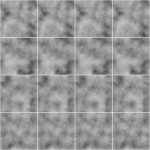
The for loop is a little tricky to use if you’re not familiar with it. Once you got that you can easily generated another periodic Worley fractal noise volume:

then multiply them together:
(You can do this inside a Cop net)
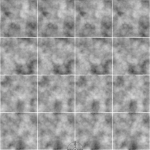
The first Perlin noise uses a very common technique called fBm (fractal Brownian motion), which basically means fractal — you combine noises with different frequencies together to get a more detailed noise while maintaining the macro shape.
Worley noise algorithm is pretty simple. For 3D noise, the voxel value is second shortest distance between the voxel scattered points in space. That gives us this fluffy visual characteristics. When mixed in the cloud volume it can either separate the volume in bubbly sections or give the edge some nice wispy details.
Combining with the distance function technique we mentioned before, the Perlin-Worley noise instantly gives you this clean and detailed look:
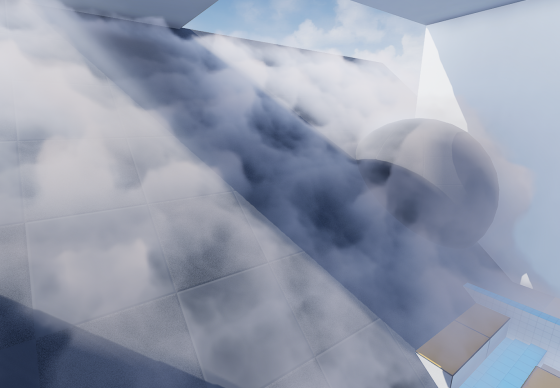
To sample Volume Texture, you treat them as 2D textures but instead of UV(float2) you feed in a UVW(float3) as coordinate in 3D space.
You can spot the consistent visual feature of Perlin noises, also the billow features from Worley noises here, which gives us a solid base shape for the cloud we’ll continue adding details to. Adding panning to the UVW input will instantly give you flowy results if the panning direction is not completely parallel to surface tangent.
Update 2020-07-01: Uploaded the .hip file since a lot of you folks are asking for it and the peer pressure is weighing me down. (actually .hiplc since I only have indie license on my WFH machine)
Create The Base Layer (within Unreal Engine 4)
This is the alternative way to author 3D noises within UE4. This awesome Volumetrics plugin by Ryan Brucks is only available in dev-main branch at the time of writing. You can find BP_Draw_Tiling_volume under Plugins\Volumetrics\Content\Content\VolumeTextures\Blueprints
Usable is pretty straightforward. Click Create Static Texture button to instantly generate a uasset of that. You can dig inside and see how it works.
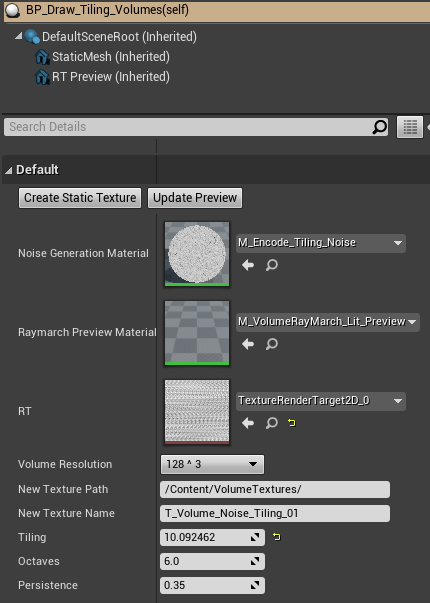
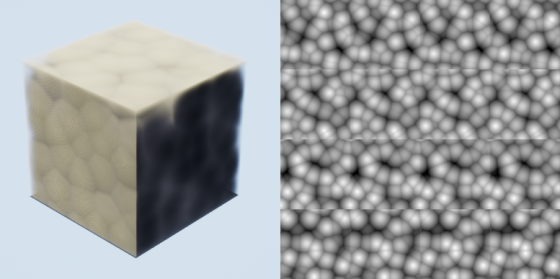
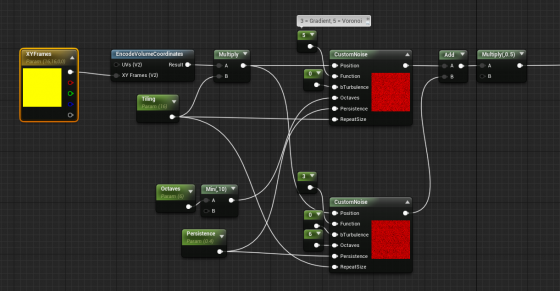
The core function here is M_Encode_Tiling_Noise, which describe the 3D texture it’s going to generate. It doesn’t come with the Perlin-Worley noise as mentioned but we can easily modify it to our heart’s content.
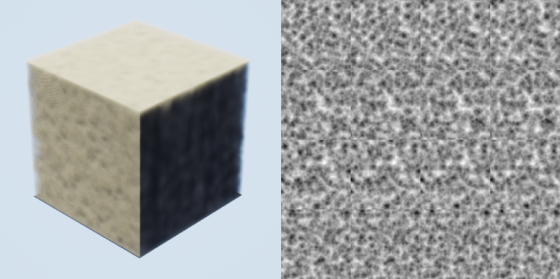
The custom node takes inputs and generates 3D noises, while Function parameter describles the noise type. Default is one gradient 3D noise as output. Here I add a Gradient (Perlin) noise and Voronoi (Worley) noise together then multiply it by 0.5. Hit Create Static Texture button we can achieve similar result as the Houdini one.
Stacking Noises To Replicate Dry Ice Fog Movement
As mentioned before. Worley noise works nicely for both macro and detail shaping. Similar to 2D textures, we can add/multiply layers of 3D noises with different patterns and panning speed to achieve a more dynamic result. To demonstrate this clearly, here’s 2 layers of 2D
panning noises multiplied:
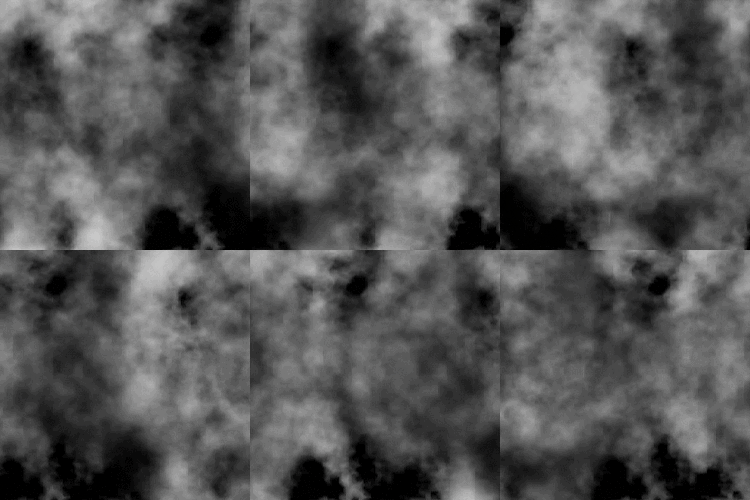
We want similar things in 3D so the fog will appear to be flowing. However, 3D noises are very expensive. For example 512^3 volume texture roughly equals 11.5k*11.5k in 2D and currently UE4 doesn’t support 3D texture streaming. Sampling such large textures multiple times, in multiple voxels, for every [GridPixelSize*GridPixelSize] pixels on screen takes a big toll on the performance.
A better strategy is stacking 3 layers of lower resolution 3D noises (128^3 for example) instead of 2 high resolution. And because the 3 layers have aggressively larger scale, they make up for low resolution:
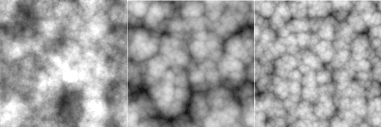

It’s not as detailed, but the extra layer adds a lot more complexity to it so we don’t see any repeated patterns.
The 3 layers of 3D noises are encoded into RGB channels of a Volume Texture respectively:

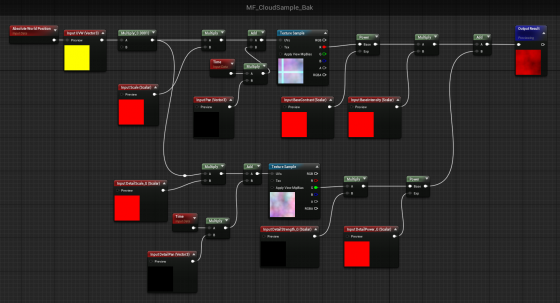
With a little tweaking, you’ll manager to get this:
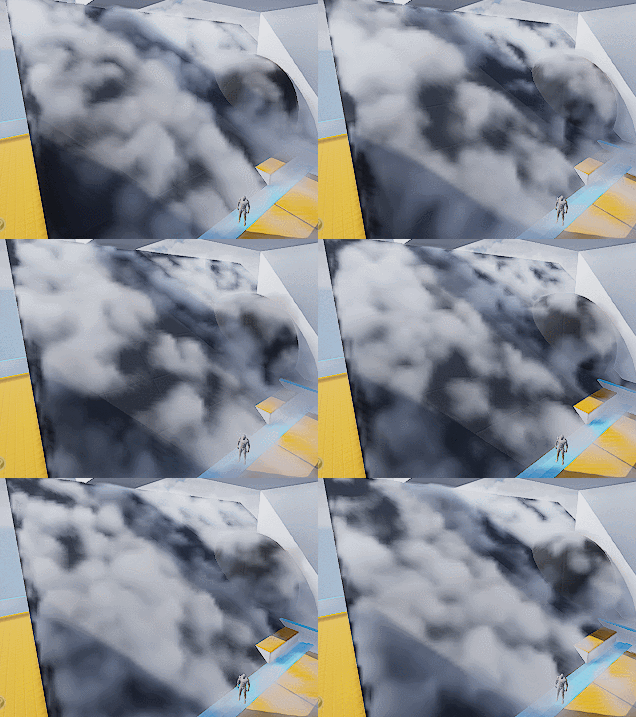
Which looks like absolutely nothing. Here begins the journey of parameters tweaking. Consider this a triumph for your tech art skills. The 3D noise behavior will start making sense when you start hallucinating.
A tip I can give though is to start simple and make sure you get a good base to work with. I spent a lot of time experimenting with the noises and trying to replicate dry ice fog movement, with only two layers of 3D textures (The R and G channels of our volume texture).
Also it’s important to tilt the panning direction away from surface tangent a little. It will result in a more dynamic look since distance field is constantly trimming the 3D noise.
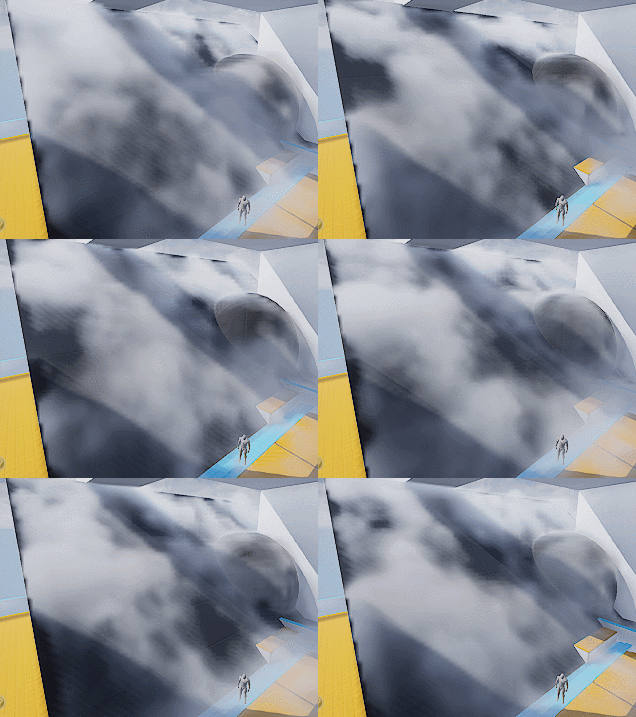
Then add a little details:
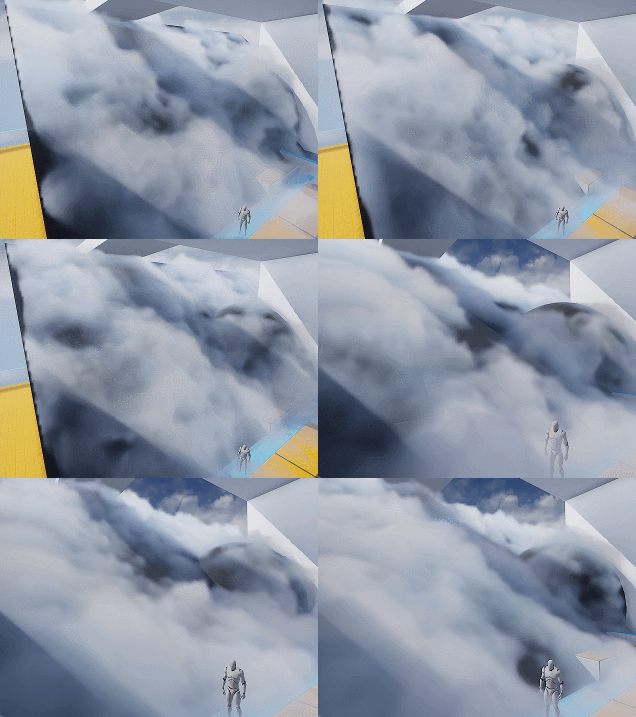
Wait what? I hear you. This feels like a ‘draw the rest of the owl’ situaltion. But the differences between the two are only two changes:
- Two more layers of noise. One of them is B channel of the volume texture, used similar to G channel. The other one is a fine tune ‘modifier’ to add refined wispy edges.
- Shadows. Offset shadow and DFAO.
Which leads to our next sections.
Add Detail – Wispy Edges
After adding another layer of Worley noise (B channel) you’ll can get something like the left picture (minus shadowing which I’ll cover later).

The overall shape is good but still lacks details. You can then add another layer of noise to A channel, or just reuse other channel to add in high frequency details (middle picture). The pattern is very repetitive but since the moving shape is already very rich, it won’t be noticeable.
Then we want to soften up the details near the ground, since dry ice fog tends to be more volatile the higher it goes (look up videos on youtube), and the slicing artifacts appear worse if the contrast is high near the ground:
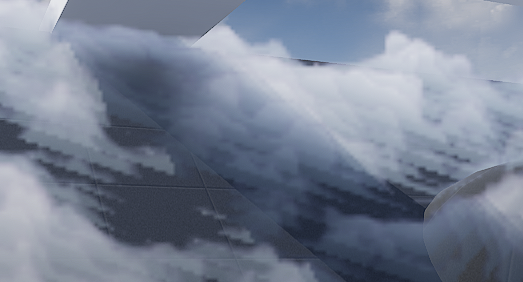
It’s fairly easy to implement the detail fading, just adjust the detail intensity according to DF value (with a power function to adjust contrast). Result is the picture on the right.
Add Detail – Curl Noise (Optional)
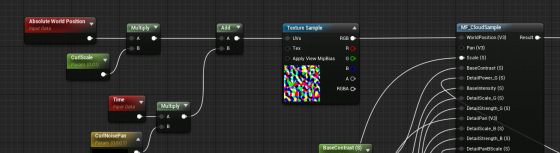
Another great way to add more character to the fog is using divergence-free curl noise to distort the space a little. It gives you stylized curvy dynamics if you cramp it up. Or add some extra curvy flavor if you can afford the extra texture sampling.
There is one under Volumetrics plugin/Content/VolumeTextures/Textures/VT_CurlNoise
Add world position with it before feeding into sampling function.
Shading
Shadow – Offset Shadow
Firstly, volumetric fog doesn’t really support self-shadowing. What we can do is darken the color of input Albedo in the Volume material to fake it. There are downsides, mainly not looking quite correct when inside actual environmental shadows (because we’re still faking shadows for directional light that doesn’t shrine through here) , which can be dealt with by raymarching scene distance field. But let’s leave that for another day.
Offset shadow, in its simplest form, is this:

The text feels solid and leaves a drop shadow on the canvas. Now if the shadow is inside the text and get blurred a little bit we get a softer shadow, which makes it look 3D.

This is exact what we’ll do to the fog. We offset the input World Position A a little toward the main directional light (World Position B) and sample MF_CloudSample again. If B has density of 0, it means there is nothing blocking light to A. A should be colored as a bright color. If B has density > 0, we darken the Albedo of A by how dense B is.

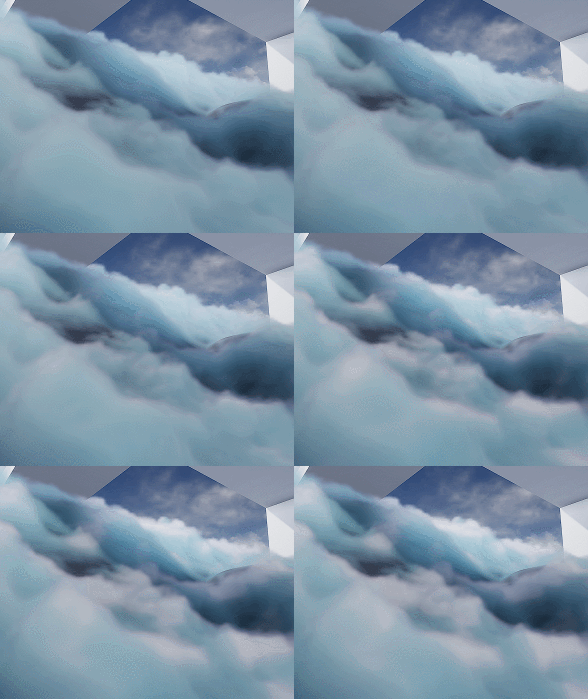
Since UE4 Volumetric Fog implementation already includes temporal jitter, the line between lighted and shadowed isn’t that obvious. You can also adjust the offset length to get a more natural look.
Offset Jitter
Aside from this, I came up with the UseJitteredOffsetShadow method here. Basically you jitter the offset length of every voxel between a range. Temporal super sampling will then smooth it out. There are some artifacts but the result looks quite good. Jitter code inside the Custom Code:
int3 randpos = int3(WorldPosition.xy, View.StateFrameIndexMod8);<br>float rand =float(Rand3DPCG16(randpos).x) / 0xffff;<br>return rand;
Shadow – DFAO
Another shadowing approach that does wonders is distance field ambient occlusion. If you don’t have distance field enabled you can use heightmap as alternative.
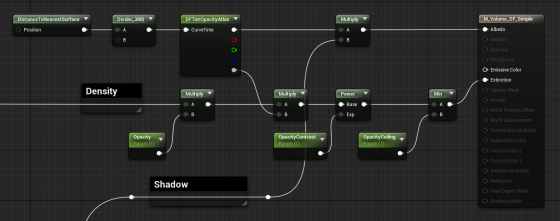
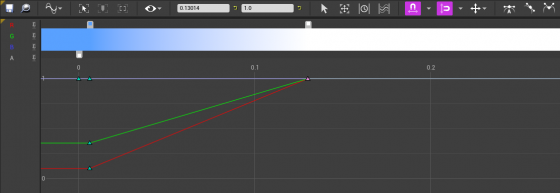
The implementation is simple — tint Albedo darker the closer it is to nearest surface. The Curve Atlas node in the graph above is an awesome engine feature that has come into existence for a while. It automatically generates a small texture from the color curve you edited, including RGBA channel. This makes adjust the DFAO tint and DF opacity influence much faster and more instinctive.
Optimization
I’m still experimenting with ideas like pre-baked scattering, and more efficient way to mask out the empty voxels. For now I’ll mention a few key points.
Since DFAO does a pretty good job in making the cloud cluster distinguishable, you may consider ditching offset shadow since that doubles the sampling cost.
It’s also very important that you understand some of the cvars config for volumetric fog. Volumetric fog is rendered into a 3D texture that will be stretched to fill your vision cone. The depth can be adjusted in ExponentialHeightFog actor – Volumetric Fog – View Distance.
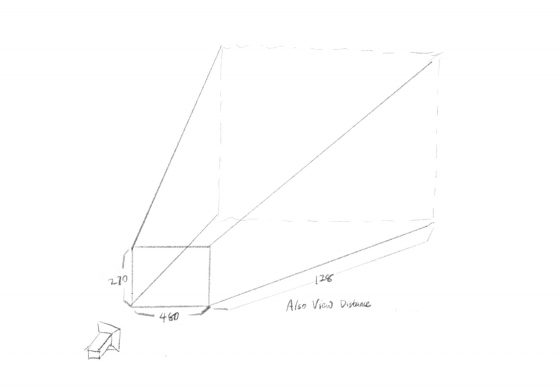
The 3D texture for this project is 480x270x128 (@1080p), as you can see in GPU Visualizer (hotkey ctrl+shift+, )
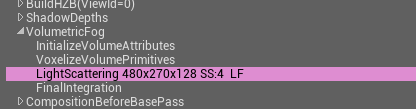
Why? Let’s see the cvars:
r.VolumetricFog.GridSizeZ 128 (default 128)
Is the resolution along the camera depth (Z) axis.
r.VolumetricFog.GridPixelSize 4 (default 8)
Is the screen pixel size per voxel in XY plane. I set it to 4, which means at 1920×1080 resolution, the XY resolution is 480×270.
Click to zoom in
These are the main parameters you can adjust to trade quality for performance very efficiently. Increase gird pixel size to 8 will make it 4x faster.
Also Decrease grid size z to 64 will make it 2x faster, but this will probably result in flickering artifacts. You can try increase
r.VolumetricFog.HistoryWeight (default 0.9)
to reduce the flickering, but the movement will appear more blurred in return. ExponentialHeightFog actor – Volumetric Fog – View Distance can also be decreased to increase quality along Z axis, at the sacrifice of rendering distance.
Finally an optimization I did that yielded noticeable result is using DF value to determine if we should sample textures and calculate output for current voxel at all. Basically you can’t do shader dynamic branching with the If node in material graph, but you can in Custom code. It’s possible to take an Alpha input calculated from distance field, to essentially avoid unnecessary texture sampling operations (and other operations) if current voxel is empty.
[branch]

// Simplified code. Ideally we should immigrate most calculations from the material graph into the if scope

[branch]
if(DF < Alpha)
{
  return float4(
    Texture3DSample(Tex, TexSampler, UVW0).r,
    Texture3DSample(Tex, TexSampler, UVW1).g,
    Texture3DSample(Tex, TexSampler, UVW2).b,
    Texture3DSample(Tex, TexSampler, UVW3).a
  );
}
else
{
   return float4(0.f, 0.f, 0.f, 0.f);
};
Now realising the topic deserved better treatment than it has been getting elsewhere, and a look at bleckblog extended that broader recognition, content that exposes the gap between actual quality and average quality elsewhere is doing the quiet work of raising standards and this site is contributing to that elevation in its own corner.
мелбет ставки [url=www.melbet05281.online]мелбет ставки[/url]
Долго откладывал, но созрел — какой вариант реально рабочий для платежей за рубежом. Порылся в интернете — обязательно гляньте этот источник: перевод денег за границу онлайн [url=https://mezhdunarodnye-platezhi-tov.ru]перевод денег за границу онлайн[/url] Короче, суть такая — комиссии у всех разные как с неба. Согласитесь любой очередной международный перевод — это риск потерять на конвертации. И да, кстати — до любой операции обязательно сравните хотя бы пару вариантов. Иначе легко попасть на лишние траты. Короче — стоит один раз разобраться.
Thanks for a post that does not try to be funny when it is not the moment for it, and a stop at sddy80 maintained the same appropriate seriousness, knowing when humour helps and when it just signals desperation for engagement is a sign of editorial maturity that many blogs have not developed yet.
Picked up a couple of new ideas here that I can actually try out, and after my visit to pujckanarekonstrukci I have even more notes saved, this is the kind of resource that pays you back for the time you spend on it which is rare to come across in this corner of the web.
Let me give it to you straight — renting a decent car in Miami is way harder than it should be. Then you actually show up to get the keys. Plus they put a $5000 hold on your card and say “don’t worry about it”. Nineteen years in South Florida and these tricks still surprise me. luxury car rental in miami. anyone who’s taken the bus here knows what I mean. Key Biscayne sunset, Bal Harbour shopping, or a spontaneous drive down to Homestead — AC must freeze your face off and unlimited miles or no deal. most are shiny garbage with fake five-star reviews. no games, no switch, no hidden fees. Here’s the only honest source for premium rides across South Florida
renting luxury cars near me [url=https://luxury-car-rental-miami-19.com]renting luxury cars near me[/url] also bring quality shades unless you like driving into the sun. drive safe and skip that “tire protection” upsell — total waste.
Speaking carefully because I do not want to overstate things this site is genuinely above average across multiple measurements, and a stop at depo50rbgcr continued the above average performance, the calibration of judgement against potential overstatement is something I take seriously and this site clears the higher bar even after that calibration applies.
Reading this triggered a small but real correction in something I had assumed, and a stop at linencovevendorroom extended that corrective effect, content that updates my beliefs through evidence rather than rhetoric is content with intellectual integrity and this site has earned that label consistently across the pieces I have read so far today.
1win история ставок [url=https://1win75197.online]https://1win75197.online[/url]
mostbet сайт нав [url=www.mostbet33044.online]mostbet сайт нав[/url]
Честно говоря, — как найти адекватный способ международных платежей. В одном блоге вычитал вот этот источник: международные платежи [url=https://mezhdunarodnye-platezhi-nar.ru]https://mezhdunarodnye-platezhi-nar.ru[/url] Главное, что нужно понять — есть скрытые подводные камни. Согласитесь, очередной международный перевод — это всегда стресс. Обратите внимание — перед тем как отправлять сравните условия. Иначе легко остаться в минусе. Короче, — не поленитесь проверить информацию.
melbet приложение на русском [url=www.melbet05281.online]melbet приложение на русском[/url]
mostbet befizetési bónusz [url=https://mostbet44364.online]mostbet befizetési bónusz[/url]
The use of plain language without dumbing down the topic was really well done, and a look at aquifera continued in that same accessible style, this is something many technical writers fail at because they either confuse their readers or condescend to them but here neither problem appears at all which is impressive really.
Comfortable read, finished it without realising how much time had passed, and a look at nabytekidea pulled me into more pages the same way, the absence of friction in good content lets time disappear and that is one of the highest compliments I can pay any piece of writing I find online during a regular search session.
Really appreciate the confidence to make a clear point rather than hedging everything, and a quick visit to acquirementsa maintained the same direct stance, writing that takes positions rather than equivocating is more useful even when the positions are debatable because at least the reader has something to react to clearly.
Честно, задолбался искать нормальный вариант — как выбрать реально работающий способ для международных платежей. Товарищ скинул ссылку на нормальный разбор: оплата за границу [url=https://mezhdunarodnye-platezhi-kap.ru]оплата за границу[/url] Суть вот в чём — курс конвертации часто занижают. Согласитесь, абсурд любой очередной международный перевод — это головная боль с отслеживанием статуса. Обратите внимание, многие не в курсе — перед финальным подтверждением обязательно сверьте итоговую сумму. Иначе легко попасть на лишние траты. Короче — лучше один раз изучить тему перед любой отправкой.
Столкнулся с ситуацией и начал разбираться — как правильно организовать процесс для платежей за рубежом. В одном обсуждении попался дельный обзор: денежный перевод с россии [url=https://mezhdunarodnye-platezhi-fra.ru]https://mezhdunarodnye-platezhi-fra.ru[/url] Суть в следующем — банковские комиссии сильно различаются. Дело в том, что любой перевод за границу онлайн — связан с разными типами комиссий. Также стоит отметить — прежде чем отправлять средства имеет смысл изучить актуальные тарифы. Без этого можно переплатить из-за невыгодного курса. Резюмируя — лучше заранее разобраться в вопросе перед любой отправкой средств.
I’ve got the horror stories to back that up. You see this amazing deal online — shiny Audi, unlimited miles, price that makes you want to book right now. Totally different car waiting — scratches everywhere, AC blowing warm, and that “amazing price”? Doesn’t include the mandatory $50 daily insurance or the $400 “service fee” they add at the counter. Nineteen years in South Florida and these tricks still surprise me. luxury car rental miami fl. Miami without proper wheels is basically a nightmare. Key Biscayne sunset, Bal Harbour shopping, or a spontaneous drive down to Homestead — AC must freeze your face off and unlimited miles or no deal. most are shiny garbage with fake five-star reviews. no games, no switch, no hidden fees. Here’s the only honest source for premium rides across South Florida
rent cadillac escalade near me [url=https://luxury-car-rental-miami-19.com]https://luxury-car-rental-miami-19.com[/url] also bring quality shades unless you like driving into the sun. Anyway glad there’s at least one straight shooter left.
Decided to set a calendar reminder to revisit, and a stop at biganki-ef extended that revisit list, calendar entries for content are a level of commitment I rarely make but when I do they signal a higher regard than a simple bookmark and this site has earned that calendar tier of relationship from me today.
Looking forward to seeing what gets published next month, and a look at alitanwir extended that anticipation across the broader site, finding myself looking forward to a sites future content rather than just consuming its existing content is a stronger commitment level than I usually reach with new finds and this site triggered that.
Долгое время искал нормальный источник — какой способ действительно работает для международных переводов. Товарищ скинул ссылку на качественный разбор: международные платежи [url=https://mezhdunarodnye-platezhi-fra.ru]https://mezhdunarodnye-platezhi-fra.ru[/url] Основной вывод, который я сделал — банковские комиссии сильно различаются. Стоит учитывать, что любой международный перевод — связан с разными типами комиссий. И ещё один момент — до проведения операции имеет смысл изучить актуальные тарифы. Без этого можно получить менее выгодные условия. Резюмируя — стоит потратить время на анализ перед любой отправкой средств.
1win promo code [url=http://1win75197.online/]1win promo code[/url]
Worth flagging that the writing rewarded a second read more than I expected, and a look at focusignition produced the same second read benefit, content with hidden depths that emerge only on careful rereading is rare in the modern blog space and this site has clearly invested in that level of compositional density throughout.
Коммерческий интерьер пекарни отличается от частного тем, что каждый метр должен выполнять задачу. Пространство должно направлять поток людей, выдерживать нагрузку, поддерживать сервис и соответствовать финансовой модели проекта: дизайн проект глэмпинга
Easily one of the better explanations I have read on the topic, and a stop at clubmana pushed it even higher in my mental ranking of useful resources, the kind of site that beats the average not by trying harder but by simply caring more about what it puts out daily which always shows.
Probably the best thing I have read on this topic in the past month, and a stop at batdeu extended that ranking, the casual ranking of recent reading is informal but real and this site has been winning those rankings for me on this topic specifically over the last several weeks of regular reading sessions.
Вот решил поделиться информацией — где предлагают адекватные условия для международных транзакций. Товарищ скинул ссылку на качественный разбор: платежи за рубежом [url=https://mezhdunarodnye-platezhi-fra.ru]платежи за рубежом[/url] Основной вывод, который я сделал — не все сервисы одинаково прозрачны. Дело в том, что любой перевод за границу онлайн — требует предварительного сравнения условий. И ещё один момент — до проведения операции имеет смысл изучить актуальные тарифы. В противном случае можно получить менее выгодные условия. Резюмируя — стоит потратить время на анализ перед любой отправкой средств.
насби mostbet [url=http://mostbet33044.online]http://mostbet33044.online[/url]
Now setting aside time on my next free afternoon to read more from the archives, and a stop at willielambert confirmed that time will be well spent, the rare site whose archive deserves a dedicated reading session rather than just casual sampling is the kind of resource worth scheduling around and this one qualifies clearly.
Кстати, недавно наткнулся на обсуждение реальных кейсов. Сам уже давно ищу нормальный способ провести транзакцию, без лишних проблем и комиссий. В общем, если вас тоже волнует эта тема — посмотрите тут. Там расписаны основные нюансы по международным переводам: прием платежей из-за границы [url=https://mezhdunarodnye-platezhi-lor.ru]https://mezhdunarodnye-platezhi-lor.ru[/url] Кстати, имейте в виду, что без нормального обменного курса любые международные платежи превращаются в сплошной геморрой. Ну и напоследок — всегда смотрите несколько площадок, прежде чем платить.
monopoly big baller tracker online [url=https://monopolyy.live/]monopoly big baller tracker online[/url].
live casino monopoly [url=https://www.monopolyy.live]https://monopolyy.live/[/url]
Closed the tab and immediately reopened it ten minutes later because I wanted to reread a part, and a stop at flaxdune drew the same return, content that pulls you back after closing it is doing something well beyond the average and worth marking as exceptional in my mental catalogue of reliable sites.
мелбет как вывести на элсом [url=www.melbet05281.online]мелбет как вывести на элсом[/url]
casino scores monopoly live vegas [url=https://monopolyy.live/]casino scores monopoly live vegas[/url].
monopoly big baller online [url=http://www.monopolyy.live]https://monopolyy.live/[/url]
mostbet bonus dövriyyəsi nədir [url=www.mostbet02606.online]www.mostbet02606.online[/url]
Thanks for the moderate length, neither so short it skips substance nor so long it bloats, and a stop at webpic hit the same balance, the right length is one of the hardest things to calibrate in blog writing and I appreciate when a team has clearly thought about it rather than defaulting.
1000 free dice monopoly go [url=http://www.monopolyy.live/]https://monopolyy.live/[/url]
Found a small mental shift after reading this, the framing here is just a bit different from the standard takes online, and a look at rubybrookmarketfoundry extended that fresh perspective across more material, the rare site whose voice actually changes how you think about something rather than just confirming existing beliefs.
Reading this in a quiet hour and finding it suited the quiet, and a stop at aspireclub extended the quiet reading mood, content that matches its own optimal reading conditions rather than fighting them is content that has been thoughtfully calibrated and this site reads as having a particular reading mood in mind throughout.
Now thinking about whether the writer might publish a longer form work I would buy, and a look at slkmlfds01 suggested the same depth would translate, content that makes me want to pay for related work in other formats is content that has earned commercial trust as well as attention trust and this site has both clearly.
Кстати, недавно наткнулся на обсуждение реальных кейсов. Сам уже давно ищу нормальный способ провести транзакцию, без лишних проблем и комиссий. В общем, если вас тоже интересуют детали — взгляните тут. Вся необходимая информация по переводу денег за границу онлайн: платежи для импортеров [url=https://mezhdunarodnye-platezhi-lor.ru]https://mezhdunarodnye-platezhi-lor.ru[/url] И да, учтите, что без прозрачных комиссий любые международные платежи превращаются в головную боль. Ну и напоследок — стоит сравнивать несколько сервисов, прежде чем переводить.
monopoly big baller time [url=http://monopolyy.live/]https://monopolyy.live/[/url]
monopoly online [url=monopolyy.live]https://monopolyy.live/[/url]
monopoly big baller live results [url=https://monopolyy.live]https://monopolyy.live/[/url]
what is monopoly game [url=https://monopolyy.live]https://monopolyy.live/[/url]
A clean read with no irritations, and a look at hanbo65 continued that frictionless quality, the absence of small irritations is something I notice only when present elsewhere and this site is one of the rare places where everything just works and lets me focus on the substance rather than fighting the format.
monopoly stocks list [url=https://monopolyy.live/]https://monopolyy.live/[/url]